




What to Look for in Timesheet Software
When hours are spread across spreadsheets, email, payroll tools, and disconnected systems, finance becomes the cleanup team. The right timesheet software gives employees a consistent way to record time, gives managers controlled approvals, and gives finance structured data before payroll, billing, accounting, or project reporting begins.
The best timesheet software for Sage Intacct should do more than transfer hours. It should help employees capture time correctly, route entries through the right approvals, preserve project or grant coding, and prepare approved data for accounting, payroll, billing, and reporting. DATABASICS provides those time-management workflows through a pre-built Sage Intacct integration.
What should timesheet software do for Sage Intacct teams?
Timesheet software should improve the completeness, coding, and approval status of time before finance uses it. Employees should select the correct projects, grants, clients, jobs, tasks, departments, or labor categories, while managers resolve exceptions and approve submissions.
Finance may need to know whether time is billable, which project or grant funded it, which department owns the labor cost, whether leave was involved, and whether the entry belongs in the correct reporting period. Integration matters, but buyers must also evaluate the workflow producing the data.
Where should time tracking happen, and what should stay in Sage Intacct?
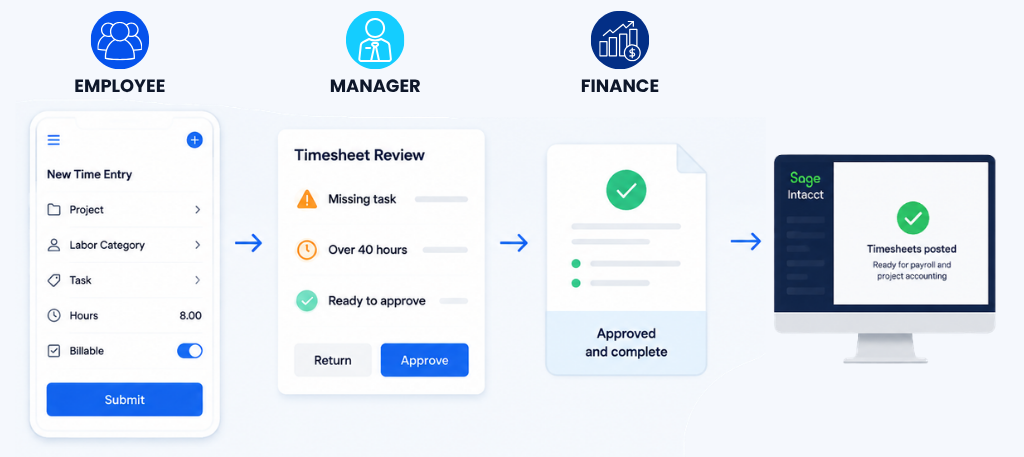
Employees and managers should use DATABASICS for time entry, coding, leave, review, and approvals, while Sage Intacct remains the accounting system.
DATABASICS gives approvers a way to address missing information or incorrect coding before approved time supports accounting, payroll, billing, project-cost, and reporting processes.
DATABASICS offers a pre-built Sage Intacct integration, and DATABASICS Time & Leave is listed in the Sage Intacct Marketplace. Because environments vary, buyers should confirm sync direction, frequency, objects, dimensions, mappings, modules, and field-level configuration.
Which employee time management capabilities matter most?
The right capabilities match how employees work, how managers approve time, and how finance classifies labor. Organizations with several locations, employee groups, or policies should review workforce management requirements alongside the integration.
Flexible entry: Support may be needed for project hours, grants, clock-in or clock-out, mobile entry, offline capture, or location-based controls.
Configurable approvals: Routes may involve a direct manager, project manager, grant owner, or another reviewer. Missing entries and coding problems should surface before finance has to correct them.
Reporting periods and rules: Different groups may use weekly, biweekly, semimonthly, or monthly periods.
Leave and exception controls: Approvers may need to review leave, missing timesheets, late submissions, policy exceptions, or overtime risks.
Organizations managing labor and spending against the same projects or grants may also benefit from timesheets & expense reports in one platform.
How can approved timesheets support payroll, billing, and accounting?
Approved timesheets provide reviewed hours and consistent labor coding, reducing the need to reconstruct data after a period closes. Project visibility also depends on timely approvals and consistent coding, not a dashboard alone.
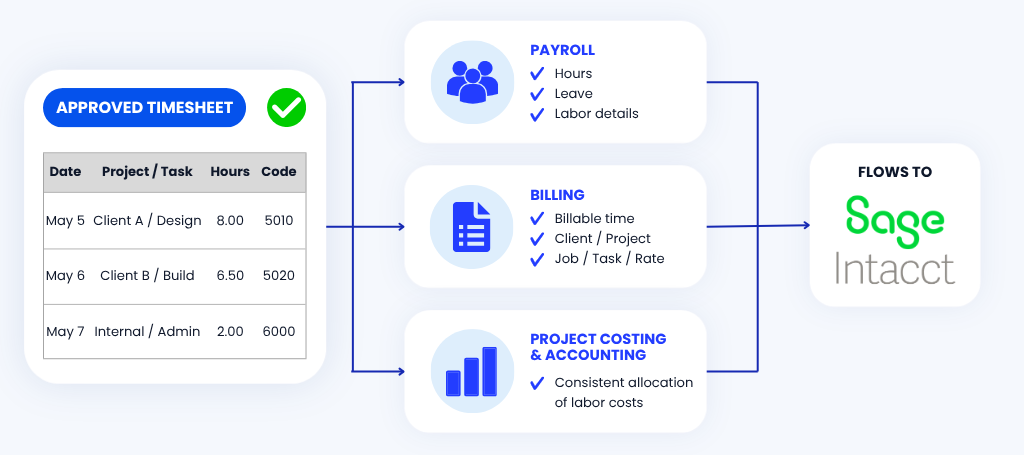
For payroll, approved time can provide hours, leave information, and labor details. For billing, billable time can retain the appropriate client, project, grant, job, task, or rate context. For project costing and accounting, consistent allocation helps finance determine where labor costs belong.
Teams should still confirm rules, cutoffs, calculations, and which system owns each step. DATABASICS improves the time workflow rather than replacing Sage Intacct.
What does a Sage Intacct customer example look like?
Search for Common Ground used DATABASICS for time and expense workflows around its Sage Intacct accounting environment.
At the time of the case study, the organization had about 1,000 employees in more than 30 countries. It was replacing custom, paper, and spreadsheet processes while addressing international timekeeping, country-specific leave, grant and budget-code selection, approvals, and audit documentation.
In its configuration, grant information and budget codes maintained in Sage Intacct were available in DATABASICS for employee selection. This example shows why time entry, leave, coding, approvals, and accounting integration should be evaluated as one workflow.
What should buyers verify before choosing a Sage Intacct integration?
Buyers should treat accounting software integration as a configured data flow, not a checkbox. Confirm:
- The direction and frequency of each data flow
- The records, objects, modules, and dimensions involved
- The mapping logic and field-level configuration
- The approval, exception, and correction process
- The downstream uses for payroll, billing, costing, and reporting
- The implementation responsibilities and testing plan
A demonstration should use a real reporting period, approval path, employee group, and project or grant structure.
What do Sage Intacct buyers ask about timesheet software?
Does DATABASICS integrate with Sage Intacct?
Yes. DATABASICS offers a pre-built integration, and DATABASICS Time & Leave is listed in the Sage Intacct Marketplace. Buyers should still verify the data flows, mappings, dimensions, modules, and fields required.
Can DATABASICS support different employee groups and reporting periods?
DATABASICS supports multiple time-entry approaches, reporting periods, work rules, mobile and offline entry, leave workflows, and clock-in or clock-out options. The final design should match the organization’s workforce and policies.
Can approved time support payroll and billing?
Yes. Approved time can provide structured inputs for payroll-ready time data, billable time, project costing, and labor allocation. Buyers should confirm which system owns each calculation, approval, rate, cutoff, and posting step.
What is the next step for a Sage Intacct team?
Test the software against a real workflow. The right timesheet software should fit your approval paths, project structure, employee groups, reporting periods, leave rules, and Sage Intacct configuration.
See how DATABASICS can support those requirements by requesting a personalized demo.
There’s a New Chief at Work: How AI Changes Compliance
Read Now
Best expense management software for construction field crews (2026)
Read Now
Timesheets and Expense Reporting Software: The Top Questions We Hear From Buyers
Read Now
Best DCAA timesheet software for government contractors (2026)
Read Now
Expense Reporting Compliance: Policy to Audit Trail
Read Now
From Timesheet to Audit Trail: Building Compliance Into Time Reporting
Read Now
