





Expense reporting compliance turns policy requirements into documented controls and an audit trail. Every expense report should help answer a few essential questions: Was the expense necessary? Does it meet company policy? Is the documentation complete? Who approved it? And how should it be treated for reimbursement, customer billing, and accounting?
For organizations managing corporate policies, government contracts, customer-funded work, or grant programs, answering those questions consistently requires controls throughout the expense process.
DATABASICS helps organizations translate those requirements into configurable expense rules, documentation requirements, approval workflows, and accounting classifications. Employees receive guidance as they report expenses, reviewers can focus on exceptions, and finance can retain the information needed to support reimbursement, billing, accounting, and audit review.
What is expense reporting compliance?
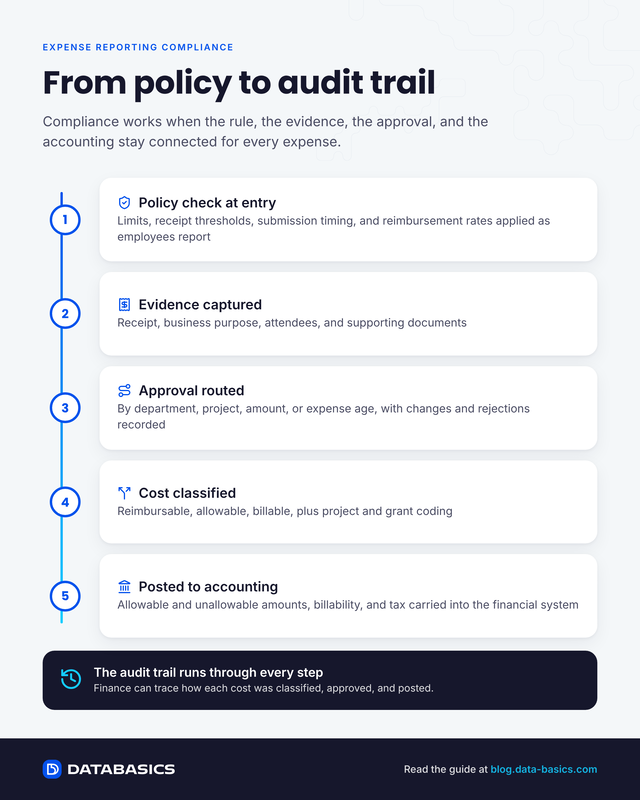
Expense reporting compliance is the process of applying organizational, contractual, tax, and funding rules to employee spending from submission through accounting. It combines policy validation, required documentation, approvals, financial classification, and a traceable audit trail so finance can show what was spent, why it was allowed, who approved it, and how it was posted.
How does expense reporting support policy compliance?
DATABASICS puts expense policies into practice by applying requirements where employees make spending and reporting decisions.
DATABASICS applies configurable expense controls by category, employee group, legal entity, project, and other criteria. These controls address spending limits, receipt thresholds, explanations, attendee details, submission timing, and reimbursement rates. See how they work in DATABASICS expense reporting software.
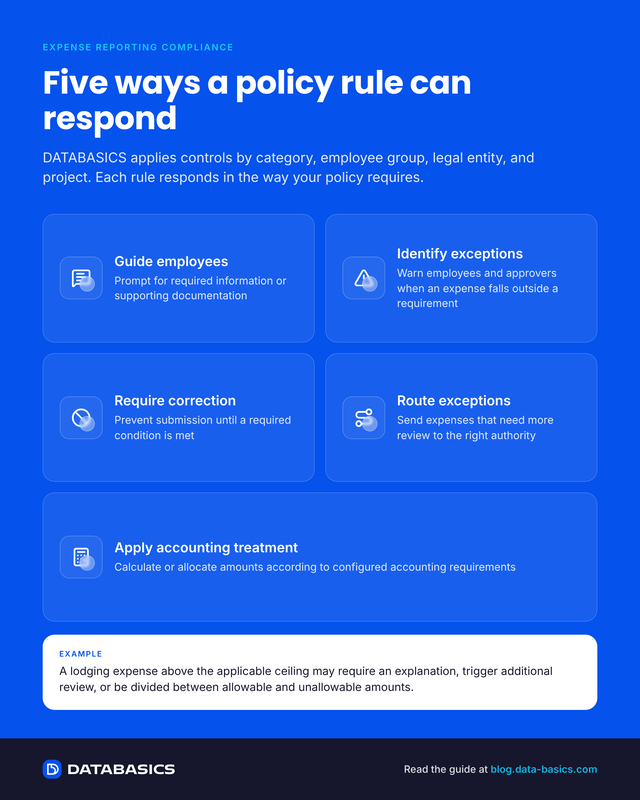
Different situations can trigger different responses:
- Guide employees: Prompt users to provide required information or supporting documentation.
- Identify exceptions: Warn employees and approvers when an expense falls outside a configured requirement.
- Require correction: Prevent submission until a required condition is satisfied.
- Route exceptions: Send expenses requiring additional review to the appropriate authority.
- Apply accounting treatment: Calculate or allocate amounts according to configured accounting requirements.
For example, a lodging expense above an applicable ceiling may require an explanation, trigger additional review, or be divided between allowable and unallowable amounts. The resulting treatment reflects the organization's configured policy and accounting requirements.
How can expense reporting capture the evidence behind a transaction?
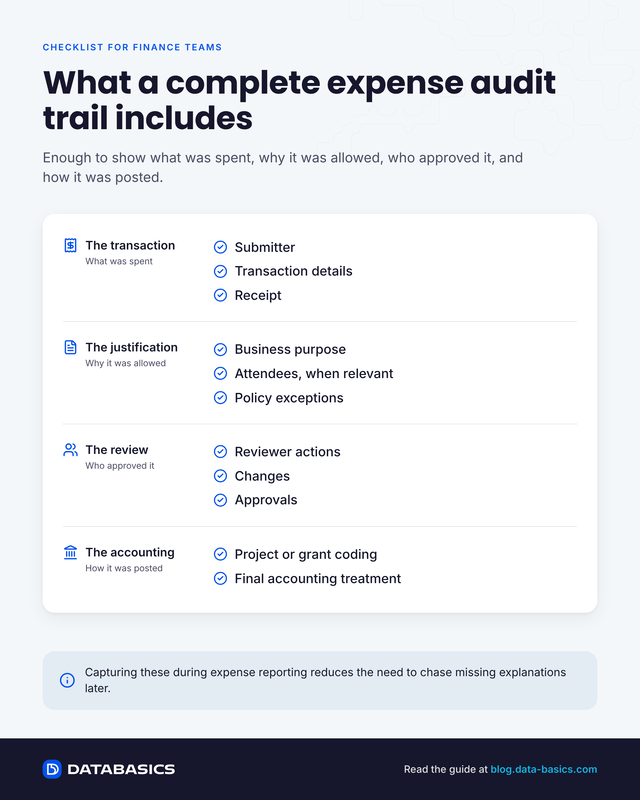
A complete expense audit trail records the receipt, business purpose, attendees, project allocation, supporting documents, approvals, changes, and final accounting treatment for each transaction.
DATABASICS requires or prompts for relevant information based on the expense type and transaction. These records also support substantiation practices described in IRS Publication 463. Examples include:
- Receipts above defined thresholds or for designated payment methods.
- Attendee details for meals, meetings, and entertainment.
- Business-purpose information that supports review and, where applicable, customer invoicing.
- Explanations for policy exceptions.
- Supporting tax documentation where applicable.
Configurable submission language can also require employees to certify that reported expenses relate to official business and meet the organization's stated requirements.
Collecting this information during expense reporting helps reviewers evaluate the claim and can reduce the need to obtain missing explanations later.
How can expense workflows support accountability?
Expense workflows establish accountability by routing each report to the right reviewer and preserving what was submitted, changed, rejected, and approved.
DATABASICS workflows can incorporate supervisors, department owners, project approvers, finance reviewers, and designated exception approvers. Routing can reflect the charged department or project, transaction amount, expense age, or other configured conditions.
Editing rights and rejection handling can also follow the organization's control model. Configurations can reserve corrections for the employee or authorized proxy, require a reason for rejection, and return a revised report through the appropriate approval steps.
Where approver edits are permitted, audit reporting can provide visibility into modifications. Alternative approvers can support out-of-office coverage while maintaining the organization's assigned review responsibilities.
Together, these controls help organizations establish who submitted, reviewed, changed, and approved an expense.
How can organizations distinguish reimbursement, allowability, and billability?
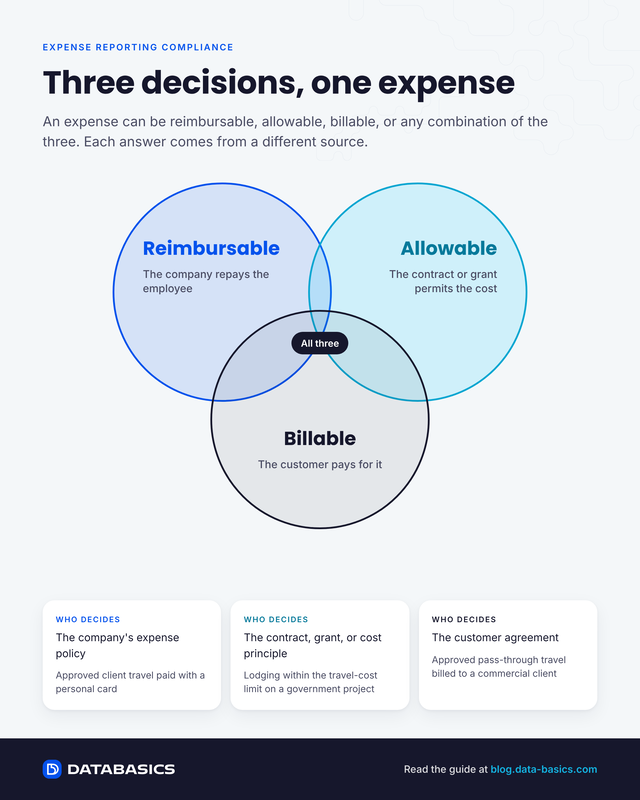
Reimbursable, allowable, and billable are three separate decisions. Reimbursable means the company repays the employee. Allowable means a government contract or grant permits the cost. Billable means the customer pays for it. One expense can be any combination of the three.
| Classification | Definition and who decides | Example |
|---|---|---|
| Reimbursable | The company repays the employee under its expense policy. | An employee pays for approved client travel with a personal card. |
| Allowable | The applicable contract, grant, or cost principle permits the cost. | Lodging within the applicable travel-cost limit is charged to a government project. |
| Billable | The customer agreement permits the organization to invoice the cost. | An approved pass-through travel expense is billed to a commercial client. |
DATABASICS supports configurations that preserve these distinctions throughout expense reporting and accounting.
For government contractors, controls apply project-based charging restrictions, expense categories tied to project-account groups, and separate allowable and unallowable account mappings. Lodging is evaluated under FAR 31.205-46 travel-cost rules and applicable GSA per diem rates. Alcohol is separated because FAR 31.205-51 makes alcoholic beverage costs unallowable.
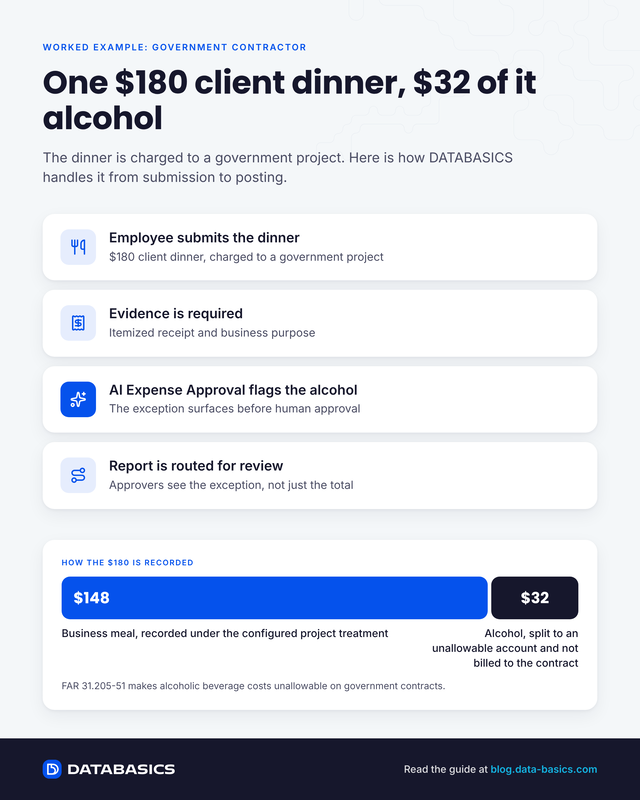
Worked example: An employee submits a $180 client dinner charged to a government project, including $32 of alcohol. DATABASICS requires the itemized receipt and business purpose, routes the report for review, records the business meal under the configured project treatment, and splits the $32 alcohol charge to an unallowable account instead of billing it to the contract. AI Expense Approval can flag the alcohol exception before human approval.
Per-diem configurations use GSA per diem schedules, account for meals provided, and apply first- and last-day rules. The organization determines whether a condition triggers a warning, requires review, or drives a calculated split.
For commercial customers, expense reporting can distinguish billable pass-through expenses from costs the organization absorbs. Business-purpose information and project coding can support the resulting customer billing process.
For grant-funded organizations, expenses are assigned to grants, tasks, funds, and other required dimensions, with restricted charging options and review by responsible budget owners under the cost principles and internal-control framework in 2 CFR Part 200. Learn more about nonprofit expense tracking with DATABASICS.
These capabilities can support expense controls within a broader compliance process, including government-contract accounting, customer billing, grant administration, and audit preparation.
How can expense systems reconcile cards, advances, and employee payments?
Expense systems reconcile cards, advances, and employee payments by tracking how each expense was funded, so a cost already paid by company card or advance is not reimbursed again. Learn more in the corporate credit card reconciliation white paper.
What happens to expense data after approval?
After approval, expense data moves to accounting with its classifications intact: project and department coding, allowable and unallowable amounts, billability, and tax. Finance can then trace how each cost was classified, approved, and posted.
DATABASICS account mappings translate expense categories and charging dimensions into financial entries. Integrations carry project and departmental allocations, allowable and unallowable classifications, billability, tax amounts, payment responsibility, and advance offsets into the receiving system, including the Sage Intacct integration. Government contractors can also review the Costpoint expense reporting guide.
Configured posting processes can select fully approved reports that have not already been extracted for accounting, billing, or reimbursement.
Audit histories and reporting help finance trace expense entry, approval actions, and modifications. This provides a clearer basis for answering questions about how a cost was classified, approved, and ultimately processed.
How can organizations support local expense requirements?
For global organizations, DATABASICS applies consistent documentation and approval controls while supporting local currencies, exchange rates, mileage and per-diem schedules, and tax treatment.
Frequently asked questions about expense reporting compliance
What is expense reporting compliance?
Expense reporting compliance is the application of policy, contract, tax, and funding requirements to employee spending, supported by documentation, approvals, classifications, and a traceable audit trail.
What should an expense audit trail include?
An expense audit trail should include the submitter, transaction details, receipt, business purpose, attendees when relevant, project or grant coding, policy exceptions, reviewer actions, changes, approvals, and final accounting treatment.
What is the difference between reimbursable, allowable, and billable expenses?
Reimbursable expenses are repaid to the employee under company policy. Allowable expenses are permitted under the applicable contract, grant, or cost principle. Billable expenses may be invoiced to the customer. One expense may fall into any combination of these categories.
What expenses are unallowable on government contracts?
Allowability depends on the contract and applicable cost principles. Examples include alcoholic beverage costs under FAR 31.205-51, while travel costs are subject to the conditions and limits in FAR 31.205-46. Contractors should classify and segregate unallowable amounts in their accounting process.
Key takeaways
Expense reporting compliance works when policy rules, supporting evidence, approval responsibility, and financial treatment remain connected from submission through accounting.
DATABASICS requires the right information, routes exceptions, preserves classifications, and creates an audit trail finance can trace. The result is cleaner reimbursement, billing, accounting, and audit review.
DATABASICS Expense
Ready to connect policy, approvals, and accounting in one process?
See how DATABASICS requires the right information, routes exceptions, and creates an audit trail finance can trace.

Expense Reporting Compliance: Policy to Audit Trail
Read Now
From Timesheet to Audit Trail: Building Compliance Into Time Reporting
Read Now
Dynamics GP to Business Central Migration: What Happens to Your Timesheets and...
Read Now
Unify Timesheets and Expenses to Speed Project Billing
Read Now
Evaluating NetSuite? Five Timesheet and Expense Reporting Questions to Ask...
Read Now
7 Questions to Ask a Dynamics Timesheet & Expense Reporting Vendor at Community...
Read Now
