





No timesheet software is DCAA certified. DCAA audits a contractor's accounting system and timekeeping controls, not the software, so the best tool is the one that enforces those controls and fits the systems you already run. In 2026, Hour Timesheet suits small firms that only need timekeeping, and Unanet and Deltek Costpoint suit contractors who want timekeeping inside a government contracting ERP. DATABASICS and Deltek Replicon suit contractors who want controlled timesheets alongside their existing ERP, and DATABASICS also handles expense reports in the same system. WrkPlan suits firms that want time, expense and incurred cost schedules from one vendor.
Disclosure: DATABASICS makes one of the products on this list. We apply the same criteria to every entry, including where we are not the best fit.
Updated October 2026. Vendor details come from each vendor's own pages or a dated third-party source, linked in each entry.
What does "DCAA compliant" timesheet software have to do?
The requirements come from the contractor's accounting system, not from a software list. DFARS 252.242-7006 lists the accounting system criteria, including a timekeeping system that identifies labor by cost objective and a labor distribution system that charges direct and indirect labor to the right cost objectives. DCAA's contractor FAQs cover how auditors look at those systems.
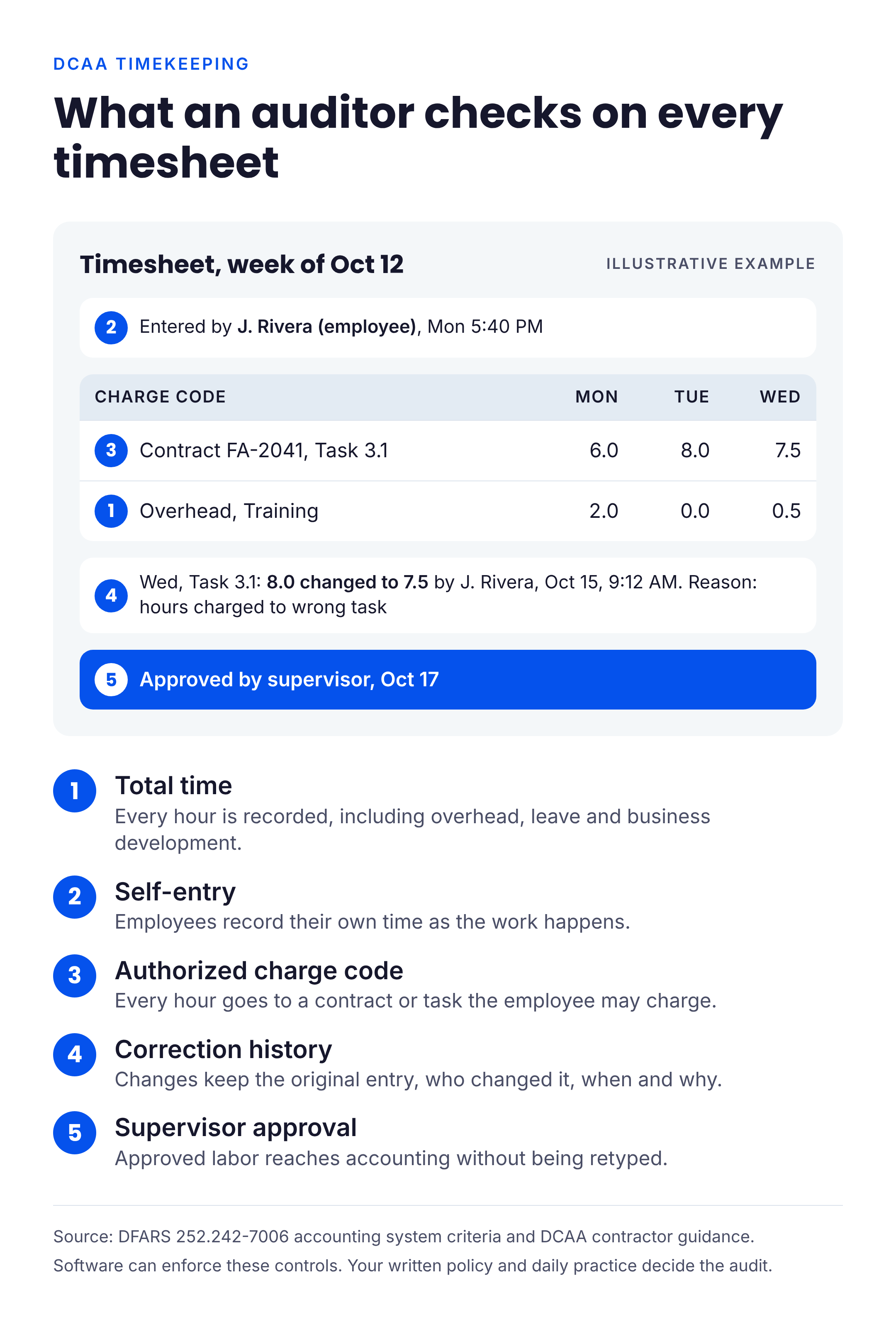
In practice, auditors and floor checks look for five things in the timesheet itself:
- Every hour is recorded, including indirect time such as overhead, G&A, leave and business development (total time accounting).
- Employees record their own time as the work happens.
- Every hour carries a charge code the employee is authorized to use.
- Corrections keep the original entry, who changed it, when and why.
- A supervisor approves the timesheet, and approved labor reaches accounting without being retyped.
Software can enforce these rules. Your written policies, training and what employees actually do still decide the audit outcome.
How we chose
We built the criteria from the questions government contractors ask us on sales calls, not from a feature checklist. Those questions are more specific than "is it DCAA compliant":
- Daily entry enforcement. Does the system remind employees who have not entered time, and can a manager see who is behind before the week closes?
- Late and proxy entries. Is there an audit report that shows who entered time late, who pre-filled future days, and when someone entered time on another employee's behalf?
- Charge code control. Can employees charge only the contracts and tasks they are assigned to?
- Pay rules. Does it handle exempt and hourly employees differently, including FLSA overtime on 9/80 schedules?
- Labor cost. Can it support job costing at weighted salary rates and weekly billing cycles?
- Expenses on the same contracts. Can it apply per diem rules, flag unallowable costs, and catch a per diem claimed on the same day as a business meal?
- Fit with accounting. Does approved time reach your ERP or payroll system, and what happens to records that fail?
A tool did not need to do everything on this list to be included. It did need to publish how it handles the core timekeeping controls.
Comparison at a glance
| Product | Best for | Key strength | What to check | Where the claim comes from |
|---|---|---|---|---|
| DATABASICS | Mid-size contractors who want timesheets and expense reports in one system next to their ERP | Time and expense coded to the same contracts, a timesheet audit report, approvers who cannot alter timesheets, batch integration with Deltek Costpoint and other ERPs | It does not replace your ERP; integrations run in batches, not continuously | DATABASICS website and product documentation, October 2026 |
| Hour Timesheet | Small contractors that mainly need timesheets | Contractor-focused timekeeping controls, QuickBooks, ADP and Gusto integrations | Expense needs and fit with accounting systems other than QuickBooks | Hour Timesheet blog, updated December 2025 |
| Unanet GovCon | Growing contractors who want time and expense inside a GovCon ERP | Blocks advance time entry, floor-check report, GSA per diem rates | Scope of an ERP project if you are not changing accounting systems | Unanet product page, October 2026 |
| Deltek Costpoint | Larger contractors ready for a full GovCon ERP | Timekeeping, indirect rates and billing in one system | Implementation effort for a smaller team | Workyard comparison, September 2026 |
| Deltek Replicon | Contractors who want dedicated time tracking with an existing ERP | FAR, DFARS and CAS timekeeping rules; integrates with Costpoint and SAP | Pricing is quoted; confirm integration with your ERP | Deltek press release, February 2024 |
| WrkPlan | Small and mid-size contractors who want time, expense and incurred cost schedules together | Charge code limits, next-day reminders, incurred cost Schedules A to O | How it fits with your current accounting system | WrkPlan features page, October 2026 |
The 6 best DCAA timesheet software options for government contractors
1. DATABASICS
Best for: government contractors with roughly 50 to 500 employees who already run an ERP and payroll system and want timesheets and expense reports coded to the same contracts in one place.
DATABASICS sits between employees and the systems of record. Employees track time against projects, jobs, clients, grants, departments, tasks or cost centers from the web or the iOS and Android apps, including offline capture in the field. Managers get alerts for missing timesheets, policy exceptions and overtime risk, and approval workflows are configured to how your organization routes approvals. The time tracking page describes validation rules, audit trails and policy enforcement as part of the product.
DATABASICS provides controls that can support DCAA compliance. They are configurable options, so your administrator decides which ones to turn on:
- Advance entry block. Employees can be stopped from entering time for future dates, with exceptions for designated leave codes such as vacation.
- Timesheet audit report. Every change is logged from the first save: who made it, whether they acted as the employee, a proxy, an approver or an administrator, when, the original entry and what changed. Rules can require an explanation for any change.
- Late and proxy entries. Time a proxy enters is recorded under the person who actually entered it. Entries for a previous day made after a set cutoff time can require a note, and floor check reports support DCAA-style floor checks.
- Assigned charge codes. Employees can be limited to the contracts, projects and labor categories assigned to them.
- Separation of duties. Approvers cannot alter a timesheet; it goes back to the employee for correction. No one can approve their own timesheet or expense report.
- Reminders and signatures. Automated emails go out for missing, unreleased or pending-approval timesheets, and electronic signature controls apply at submission.
- Overtime rules by group. Overtime calculation can differ by employee group, including exempt status, and by workweek definition.
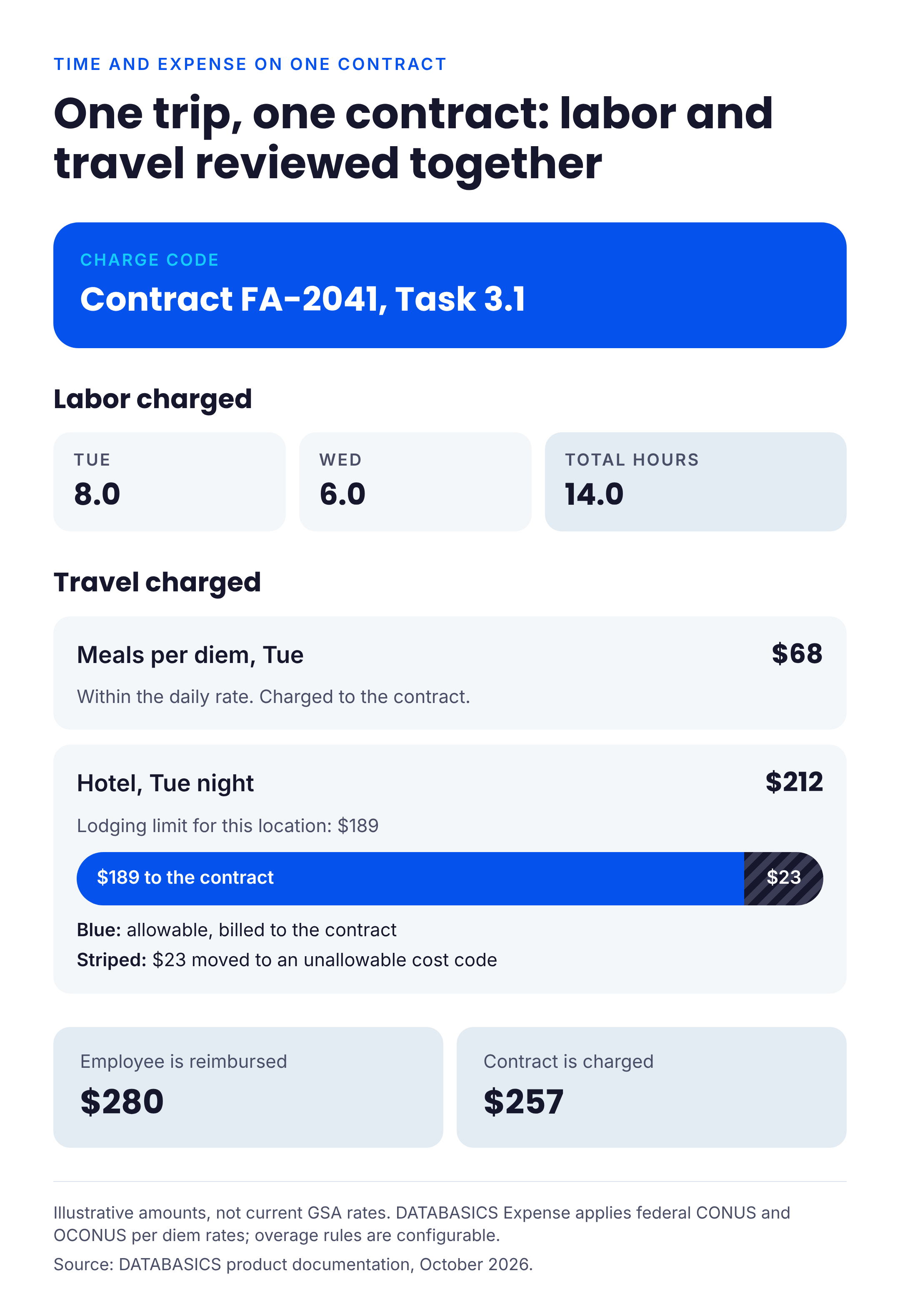
The case for one system is the expense side of the audit. A trip charged to a contract carries per diem rules, receipts and unallowable costs that have to line up with the labor charged to the same contract. DATABASICS Expense applies federal CONUS and OCONUS per diem rates and can move any amount over the limit to an unallowable cost code, so the employee is reimbursed the actual cost while the contract is charged only the allowable amount. Receipt matching uses OCR with AI-assisted review, with a designated human approving each report. The optional DATABASICS Visa Commercial Card adds spend controls, merchant blocking and hard limits on that card; third-party corporate card feeds arrive in daily batches.
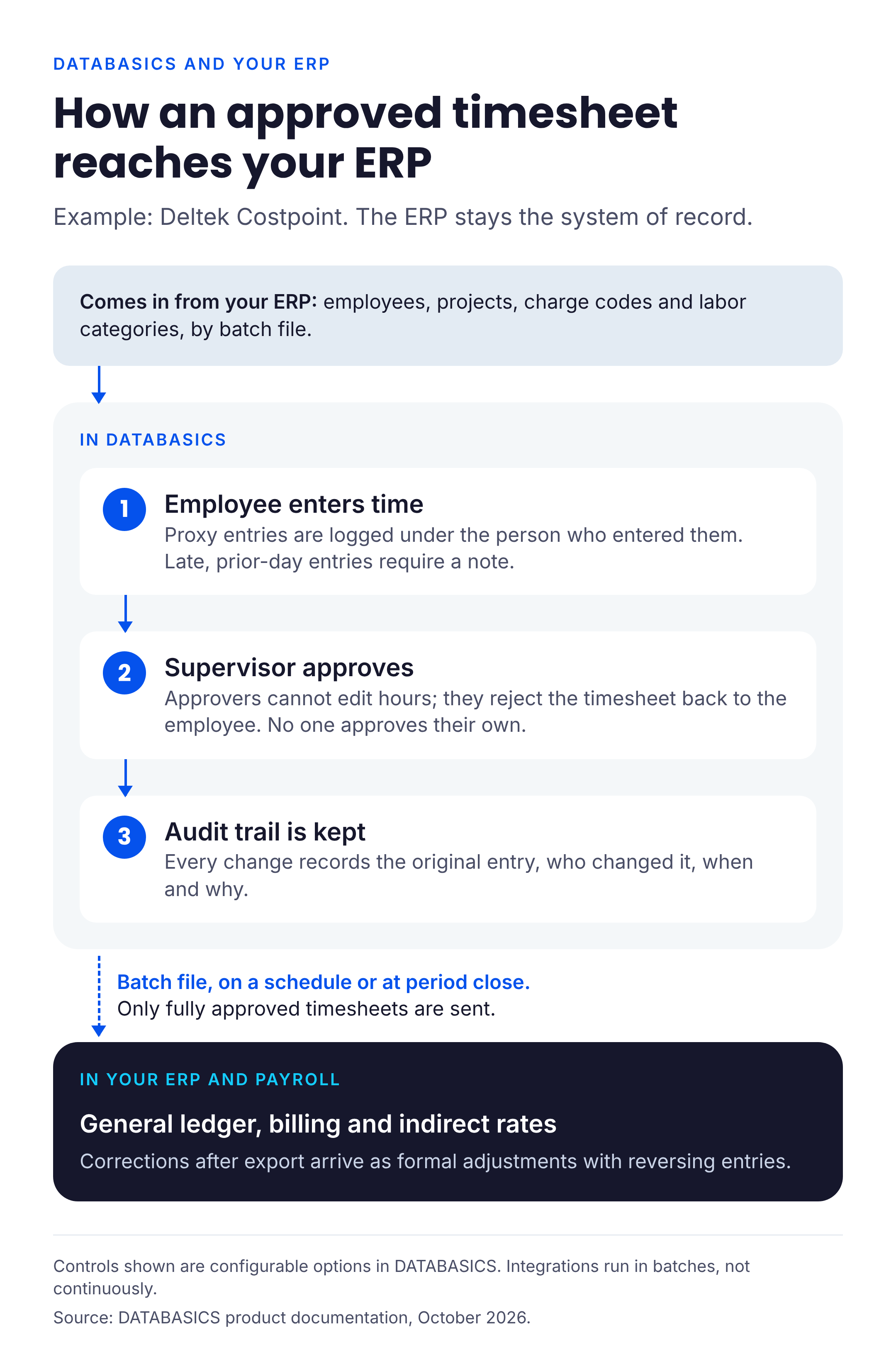
Approved labor and expense data moves to your ERP and payroll in batches, and the ERP stays the system of record. With Deltek Costpoint, employees, projects, labor categories and project assignments come in from Costpoint. Only fully approved timesheets and expense reports go back, as files over SFTP on a schedule or when an administrator closes the period. A correction after export goes through as an adjustment with reversing hours. Other integrations include NetSuite, Sage Intacct, Microsoft Dynamics, SAP, QuickBooks, ADP, APS and Workday.
CALIBRE, a federal contractor, has used DATABASICS for more than 10 years with Microsoft Dynamics SL and ADP. DATABASICS also has a CMMC Level 1 self-assessment for safeguarding Federal Contract Information.
What to verify: DATABASICS is not an ERP. Indirect rate calculation, general ledger and billing stay in your accounting system, so confirm what the batch file to your ERP contains and how often it will run. Leave management is an add-on, and implementation time depends on your configuration and integrations.
2. Hour Timesheet
Best for: small contractors that mainly need a timesheet and run QuickBooks, ADP or Gusto.
According to Hour Timesheet's own page (updated December 2025), it sends daily reminders, prevents future-dated entries, logs username, IP address and timestamp on changes, supports electronic employee certification and supervisor approval, and locks records after final approval. Non-billable codes cover G&A, overhead and business development.
What to verify: the product centers on timekeeping. If expense reporting, per diem or a non-QuickBooks ERP matters to you, ask how those are handled before you compare totals.
3. Unanet GovCon
Best for: growing contractors who want time, expense and project accounting in one government contracting ERP.
Unanet's time and expense page (as of October 2026) describes blocking time entered in advance on government projects, reminders to employees and their managers when time is missing, a floor-check report and timesheet status dashboard, and an audit trail of changes. On the expense side it lists built-in GSA per diem, lodging and travel rates by location for CONUS and OCONUS, with amounts above the allowable rate split into allowable and unallowable cost.
What to verify: these features sit inside Unanet's ERP. If you plan to keep your current accounting system, ask what a time and expense deployment looks like without the rest of the ERP.
4. Deltek Costpoint
Best for: larger or more complex contractors that want one ERP for timekeeping, indirect rates, project accounting and billing.
Workyard's September 2026 comparison describes Costpoint as a full government contracting ERP that includes timekeeping, indirect rates and billing. It also notes Costpoint is not construction-specific and has a longer implementation timeline.
What to verify: whether your team needs a full ERP change to solve a timesheet problem.
5. Deltek Replicon
Best for: contractors that want a dedicated time tracking product and plan to keep their existing ERP.
Deltek's February 2024 announcement says Replicon supports FAR, DFARS and CAS accounting and timekeeping requirements, includes labor law compliance libraries, and integrates with Deltek Costpoint, SAP and other ERP, HCM and payroll platforms. Replicon is owned by Deltek.
What to verify: pricing is quoted rather than published, per Workyard's comparison. Ask whether expense reporting is in scope and how the integration with your specific ERP runs.
6. WrkPlan
Best for: small and mid-size contractors that want timesheets, expenses and incurred cost reporting from one vendor.
WrkPlan's features page (as of October 2026) describes limiting employees to assigned charge codes and labor categories with maximum limits or expiration dates, emailing employees who did not update their timesheet the previous day with supervisors copied, printing records by person, charge number or week for auditors, and routing approved subcontractor hours to accounts payable. It also says it can prepare incurred cost Schedules A to O.
What to verify: WrkPlan calls itself a time and expense ERP, so confirm how it fits with the accounting and payroll systems you already run.
Questions to ask on every demo
Ask the vendor to do these live, in a test account, rather than describe them:
- Show an employee who did not enter time yesterday. What reminder goes out, and who else sees it?
- Edit an approved timesheet. What does the history show about the original entry, who changed it, when, and why?
- Run the report of entries made late, pre-filled for future days, or entered by someone other than the employee.
- Have a manager enter time for an employee. How is that proxy entry recorded?
- Try to charge a contract the employee is not assigned to.
- Set up an exempt employee and an hourly employee on a 9/80 schedule. How are overtime and pay periods handled?
- Submit a trip with a per diem and a business meal on the same day. What gets flagged, and how is unallowable cost separated?
- Send approved time to your ERP or payroll system. What is in the file, how often does it run, and what happens to a record that fails?
Frequently asked questions
Is any timesheet software DCAA certified or DCAA approved?
No. DCAA audits the contractor's accounting system and controls, and does not certify or approve software products. A vendor can provide controls that support DCAA compliance, but the contractor stays responsible for its policies and records.
Do we need a full GovCon ERP to pass a DCAA audit?
No. The DFARS criteria apply to your accounting system as a whole, which can be an ERP plus a separate timekeeping system. Contractors who are happy with their current ERP often add a dedicated timesheet tool such as DATABASICS, Deltek Replicon or Hour Timesheet. Contractors who are replacing accounting anyway often look at Unanet or Deltek Costpoint.
Does time need to be entered every day?
Floor checks test whether recorded time matches what employees are working on, which is hard to show when time is filled in at the end of the week. That is why most products on this list publish some form of missing-time reminder or advance-entry block. Your written timekeeping policy should say how often employees record time.
Should timesheets and expense reports be in the same system?
It is not required. It helps when the same contracts carry both labor and travel, because per diem rules, unallowable costs and labor charges can be reviewed together against one set of charge codes.
Is DCAA timekeeping the same as certified payroll?
No. Certified payroll (form WH-347) is prevailing wage reporting under the Davis-Bacon rules. It uses the same labor data but is a separate requirement from DCAA timekeeping, as Workyard's comparison notes.
What does a DCAA-ready timesheet need at minimum?
Total time accounting, employee self-entry, authorized charge codes on every hour, a correction history with reasons, supervisor approval, and a clean handoff of approved labor to accounting. Test each of these on a demo before comparing prices.
Where to start
Start with the system you plan to keep. If your ERP and payroll are staying, shortlist a dedicated timesheet tool and run the eight demo tests above against your own charge codes and pay rules. If you are replacing accounting in the next year, evaluate the GovCon ERPs first and decide whether their timekeeping covers what your auditors look for. To see how DATABASICS handles timesheets and expense reports for government contractors, book a demo and bring the checklist.

Best DCAA timesheet software for government contractors (2026)
Read Now
Expense Reporting Compliance: Policy to Audit Trail
Read Now
From Timesheet to Audit Trail: Building Compliance Into Time Reporting
Read Now
Dynamics GP to Business Central Migration: What Happens to Your Timesheets and...
Read Now
Unify Timesheets and Expenses to Speed Project Billing
Read Now
Evaluating NetSuite? Five Timesheet and Expense Reporting Questions to Ask...
Read Now
