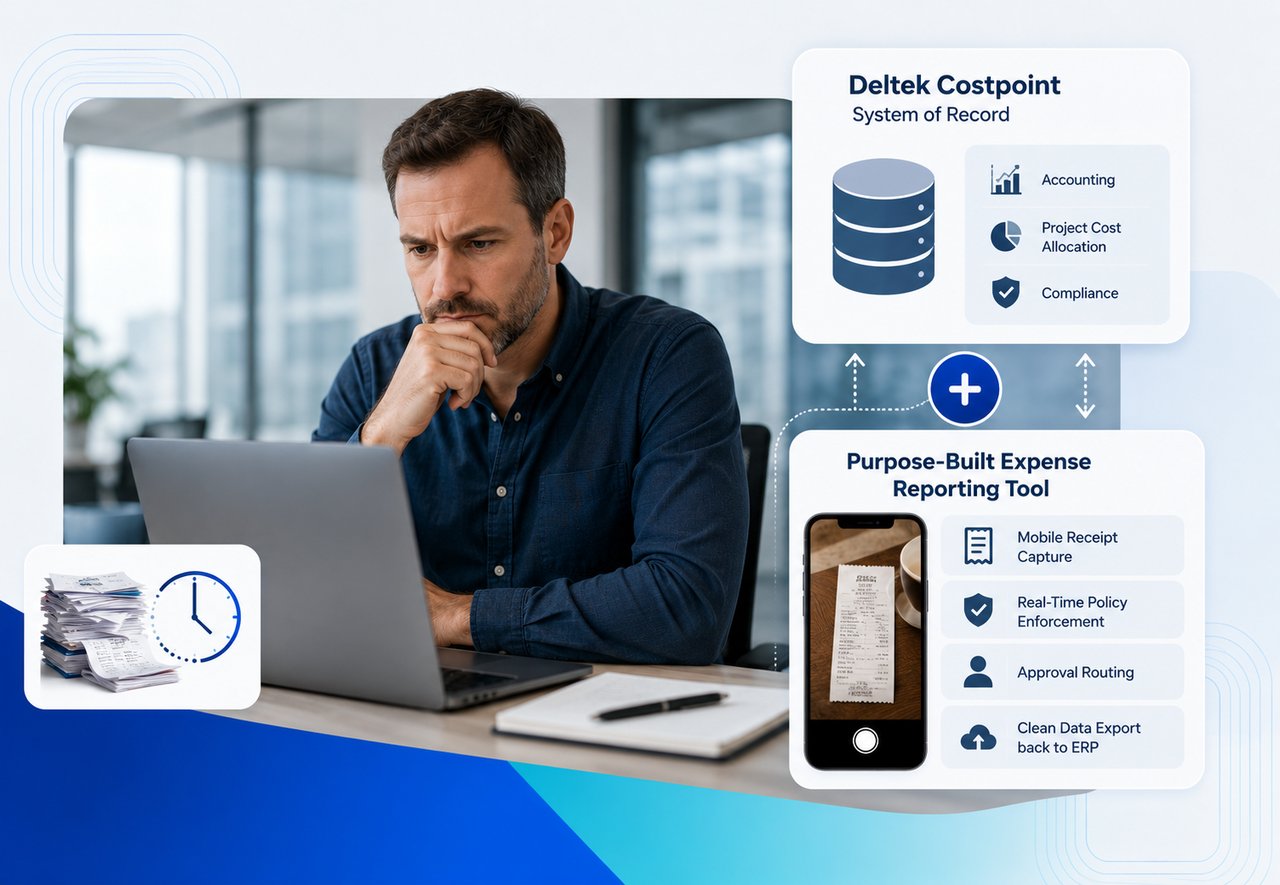


Your Deltek Costpoint implementation probably was an expensive endeavor. The focus was to find the best solution to handle job costing, project accounting, indirect rate pools, and incurred cost submissions. Also, pass your last DCAA audit. None of that means it's any good at expense reporting.
Deltek Costpoint's built-in expense module was designed as an extension of its accounting engine, not as a tool employees built for your (non-accounting staff) users. The result: a cumbersome solution that is confusing to your users which creates a process where your AP team is chasing missing receipts, and your month-end close takes longer than it should.
You don't need to rip out Costpoint to fix this. You can keep Costpoint as your system of record for accounting, project cost allocation, and compliance. Then you layer a purpose-built expense reporting tool on top to handle the parts Costpoint was never designed for: mobile receipt capture, real-time policy enforcement, approval routing, and clean data export back into your ERP.
Why Does Deltek Costpoint's Native Expense Module Frustrate Users?
Deltek Costpoint's expense functionality works the way ERP modules tend to work: it prioritizes data structure over user experience. That's not a knock on Deltek. ERPs are accounting systems first. But the downstream effects on expense reporting are predictable.
The mobile app gap is real. Costpoint does have a mobile time and expense app, but user reviews say that it's inefficient and outdated. When the mobile experience is painful, employees default to hoarding receipts in envelopes and submitting everything in bulk at month-end, which is exactly the behavior that creates close delays and compliance risk.
Configuration complexity creates admin burden. Costpoint expense reporting requires setup across multiple maintenance screens before anyone can submit a single report. Expense types, receipt thresholds, approval hierarchies, batch types, vendor travel info, and currency schedules all need configuration. For any sized government contractor, that's a significant administrative lift just to keep the system running, and every new project or contract modification can trigger another round of setup changes.
Policy enforcement happens after the fact. In most Costpoint expense workflows, policy violations surface during the approval process or, worse, during an audit. The system validates data structure (did you fill in the required fields?), but it doesn't proactively stop an employee from submitting a dinner receipt that violates your per-person meal cap before the report ever hits an approver's queue.
What Does "Layering" an Expense Tool on Costpoint Actually Mean?
Layering means Deltek Costpoint stays exactly where it is. Your chart of accounts doesn't change. Your project charge codes don't change. Your indirect rate structure doesn't change. Your incurred cost submission process doesn't change.
What changes is where employees interact with expense reporting. Instead of logging into Costpoint's expense module (or fighting the mobile app), they use DATABASICS Expense to:
- Snap a photo of a receipt from their phone and let OCR pull the vendor, amount, date, and category automatically
- See their available project charge codes, pulled from Costpoint, so allocations are correct from the start
- Get flagged in real time if a line item violates policy (over per diem, missing receipt, duplicate submission)
- Route the completed report through your approval chain, with backup approvers so nothing stalls
Once approved, the expense data exports into Costpoint with the correct account coding, project allocation, and organizational mapping already applied. Your accounting team picks it up in Costpoint the same way they always have.
Want to see the Costpoint workflow without replacing Costpoint?
Start with the Deltek integration overview, then look at how DATABASICS handles expense capture, approvals, and ERP export in the product itself. If you are evaluating audit risk or month-end drag, the related DCAA and reimbursement articles are a strong next read.
How Does the DATABASICS-Costpoint Integration Handle Project Charge Codes?
GovCon expense reporting lives and dies on charge code accuracy. A meal charged to the wrong contract isn't just a data entry error; it's a potential DCAA finding.
DATABASICS maps to your Costpoint project hierarchy, including project codes, organizations, accounts, and user-defined fields, into the expense submission interface. When an employee creates an expense report, they select from the same charge structure that exists in Costpoint. The system restricts which codes are available based on the employee's assignments, so an engineer on Contract A can't accidentally charge a meal to Contract B.
That restriction happens at the point of entry, not at the point of review. By the time an approver sees the report, the charge code is already validated against the employee's authorized project list.
When the approved report exports to Costpoint, it maps directly to the correct general ledger accounts, project cost pools, and organizational codes. The accounting team doesn't need to touch it unless something unusual needs manual review.
Does This Affect DCAA Compliance?
No. DCAA compliance requirements around expense reporting focus on a few non-negotiable areas:
- Segregation of direct and indirect costs. DATABASICS Expense enforces this at submission by restricting charge codes to the employee's authorized project list and flagging misallocations before the report is approved.
- Receipt documentation. The system requires receipt images for any expense above your configured threshold. No receipt, no submission. The image is stored with the expense record and carries through to Costpoint.
- Approval audit trail. Every approval, rejection, and modification is logged with timestamps and user IDs. That audit trail lives in DATABASICS Expense and is available for DCAA review alongside your Costpoint records.
- Timely recording of costs. When employees can submit expenses from their phone in under five minutes, they do it the week the expense happens instead of three weeks later. That alone improves the accuracy of your incurred cost reporting.
DCAA examined $599.8 billion in contract costs in FY2024 and identified $15.9 billion in audit exceptions, according to the agency's FY2024 Report to Congress. Common findings include inconsistent charging of direct costs across contracts and failure to maintain proper documentation. A system that enforces correct charge codes and captures receipts at the point of expense, before the data ever reaches your accounting system, directly reduces your exposure to these findings.
What About Per Diem Calculations and GSA Rates?
DATABASICS Expense management automatically maintains current GSA per diem rates and applies them based on the travel location and dates entered by the employee. If your organization uses modified per diem schedules (common in GovCon), those custom rates are configurable in the system.
The calculation happens during expense entry, not after. An employee traveling to Arlington, VA sees the correct lodging and M&IE rates for that location before they submit. If they're over the per diem cap, they know immediately and can either adjust the expense or add a justification note for the approver.
This eliminates the back-and-forth cycle where AP reviews an expense report, flags a per diem overage, kicks it back to the employee, waits for a response, and then re-reviews. That cycle can add days to your close process, and it multiplies across every traveling employee in the organization.
Can DATABASICS Expense Reporting Handle Our Corporate Card (or P-Card) Transactions?
Yes. DATABASICS ingests corporate card transaction feeds and matches them to expense reports automatically. When an employee creates a report, their card transactions for the period appear as line items they can claim, categorize, and allocate to the correct project code. No manual entry for the transaction amount, date, or vendor, just the allocation and any required notes.
DATABASICS also offers its own Visa® Commercial Card program with built-in expense management, which eliminates the reconciliation gap between the card provider and the expense system entirely. Transactions flow directly into the expense workflow with no import step.
For organizations that want to keep their existing P-Card program, the feed integration works with major card providers and maps transactions into the same approval and export workflow that feeds Costpoint.
What If We Also Need Time Tracking?
DATABASICS started as a time tracking and expense management company. The expense reporting product runs on the same platform, which means employees can manage timesheets and expense reports in one place, with the same project charge codes, the same approval chains, and the same export to Costpoint.
That matters for GovCon organizations where time and expense data need to align at the project level. If an engineer charges 40 hours to Contract A in their timesheet, but their travel expenses for the same week are charged to Contract B, that inconsistency will eventually surface in an audit. A unified platform makes that mismatch visible before it becomes a finding.
How Long Does the Deltek Costpoint Integration Take to Implement?
Implementation timelines vary based on the complexity of your Costpoint configuration, but DATABASICS has implemented Costpoint integrations for government contractors ranging from 50 to over 500 employees. The integration is pre-built, not custom-coded for each customer, which means the project is about configuration and mapping, not development.
A typical implementation includes mapping your Costpoint chart of accounts, project hierarchy, and organizational structure into DATABASICS; configuring your expense policies and approval workflows; testing the data export with a parallel run; and training your employees and approvers. Most implementations run 6 to 10 weeks from kickoff to go-live, depending on internal review cycles on the customer side.
Who Is This a Good Fit For?
DATABASICS Expense layered on Costpoint works best for organizations that meet a few criteria:
- Government contractors with 50 to 5000+ employees who have outgrown Costpoint's native expense module but can't afford the compliance risk of switching ERPs. This is the core use case, and it's why the integration between Deltek and DATABASICS exists.
- Organizations with traveling employees who need to submit expenses from the field, not from a desktop terminal back at the office. If your people are on job sites, at client locations, or traveling between offices, mobile expense capture isn't a nice-to-have. It's how you get timely, accurate cost data.
- Finance teams drowning in month-end expense cleanup. If your AP team spends the first week of every month chasing down expense reports, fixing charge codes, and re-keying data from paper receipts into Costpoint, that's a workflow problem, not a people problem. Fixing the workflow fixes the close.
- Companies preparing for a DCAA audit. If you know an incurred cost audit is coming (or overdue), tightening your expense capture and documentation process now is the single fastest way to reduce your audit risk. DATABASICS gives you the receipt trail, the approval history, and the charge code validation that auditors look for.
FAQ
Can DATABASICS replace Costpoint entirely?
No, and it's not designed to. Costpoint is your ERP, your general ledger, your project accounting engine. DATABASICS replaces the expense reporting workflow that sits in front of Costpoint, not the accounting system behind it.
Does DATABASICS support subcontractor expense reporting?
Yes. Subcontractors can be set up with their own access to submit expenses, with charge code restrictions specific to their contract scope. Their expenses flow through the same approval and export process as employee expenses.
What happens if we upgrade Costpoint versions?
The DATABASICS integration uses Costpoint's standard data interfaces, so version upgrades on the Costpoint side don't typically require integration rework. DATABASICS maintains the integration as part of its standard support.
How does DATABASICS handle multi-company Costpoint configurations?
DATABASICS supports multi-company setups by mapping each company's chart of accounts, project hierarchy, and organizational structure independently. Employees are restricted to their assigned company's charge codes, and exports are batched by company to match Costpoint's multi-company processing requirements.