

Community Summit North America runs October 11 to 15 at the Gaylord Opryland Resort in Nashville, with more than 500 sessions on Dynamics 365, Power Platform, and AI, according to the official Summit FAQ. The expo hall is open October 12 to 14. For a lot of Dynamics customers, that hall is where next year's timesheets & expense reports budget line gets started, usually in a 10-minute demo built around a mobile app, a receipt photo, and a dashboard.
The meetings that actually produce a decision start somewhere else. They start with the operating questions your organization hasn't resolved yet. The most useful vendor meetings answer seven operating questions about outcomes, system ownership, financial dimensions, exceptions, integration monitoring, audit evidence, and long-term support.
A credible Dynamics time and expense vendor should be able to show how your real data reaches the general ledger, where failed entries go, who receives an alert, and how corrections move between systems. The vendor should also tell you when Microsoft’s native expense tools may already be sufficient. Use the seven questions below to test those answers consistently.
- What outcome must time and expense data deliver by 2027?
- Which system is the source of truth?
- Do your project, grant, and job dimensions reach the general ledger intact?
- What happens to an entry that fails validation?
- Who notices when the integration fails, and who fixes it?
- Can you answer an auditor without leaving the tool?
- Who owns the system in year 2 or 3 after implementation?
Every one of these can be answered in a 15-minute expo conversation, so we invite you to stop by Community Summit NA and ask away!
1. What outcome must time and expense data deliver by 2027?
Name two or three measurable outcomes, each with a current baseline and a named executive owner, before any vendor shows you a feature. Without a baseline, every pitch on the floor sounds equally good.
Time and expense data feeds payroll, project costing, client billing, and compliance. A tool that demos well but doesn't move a number someone owns becomes a 2027 line item with no defender at renewal.
Corrections are a good place to start measuring. GBTA research found that roughly 19% of expense reports contain errors or missing information, and each one costs $52 and 18 minutes to fix. Using those averages, an organization processing 1,000 reports a month spends close to $10,000 and 57 staff hours every month on corrections alone. Your numbers will differ. That's the point of pulling them.
Useful baselines include approval cycle time, correction rate, cost per report, and the lag between entry and posted cost in Dynamics. Measure that lag separately for time and expense. If labor reaches a project in days and travel reaches it in weeks, project margin reporting is always partial. Set a 2027 target for each one. If the conversation reaches "AI" before it reaches any of these, steer it back.
Before Summit: pull 12 months of approval and correction data.
2. Which system is the source of truth for time and expense data?
Dynamics should remain the financial system of record, but each upstream record type also needs one clearly named master.
"When Finance, the project manager, and the employee see different numbers, which system wins, and who decides?"
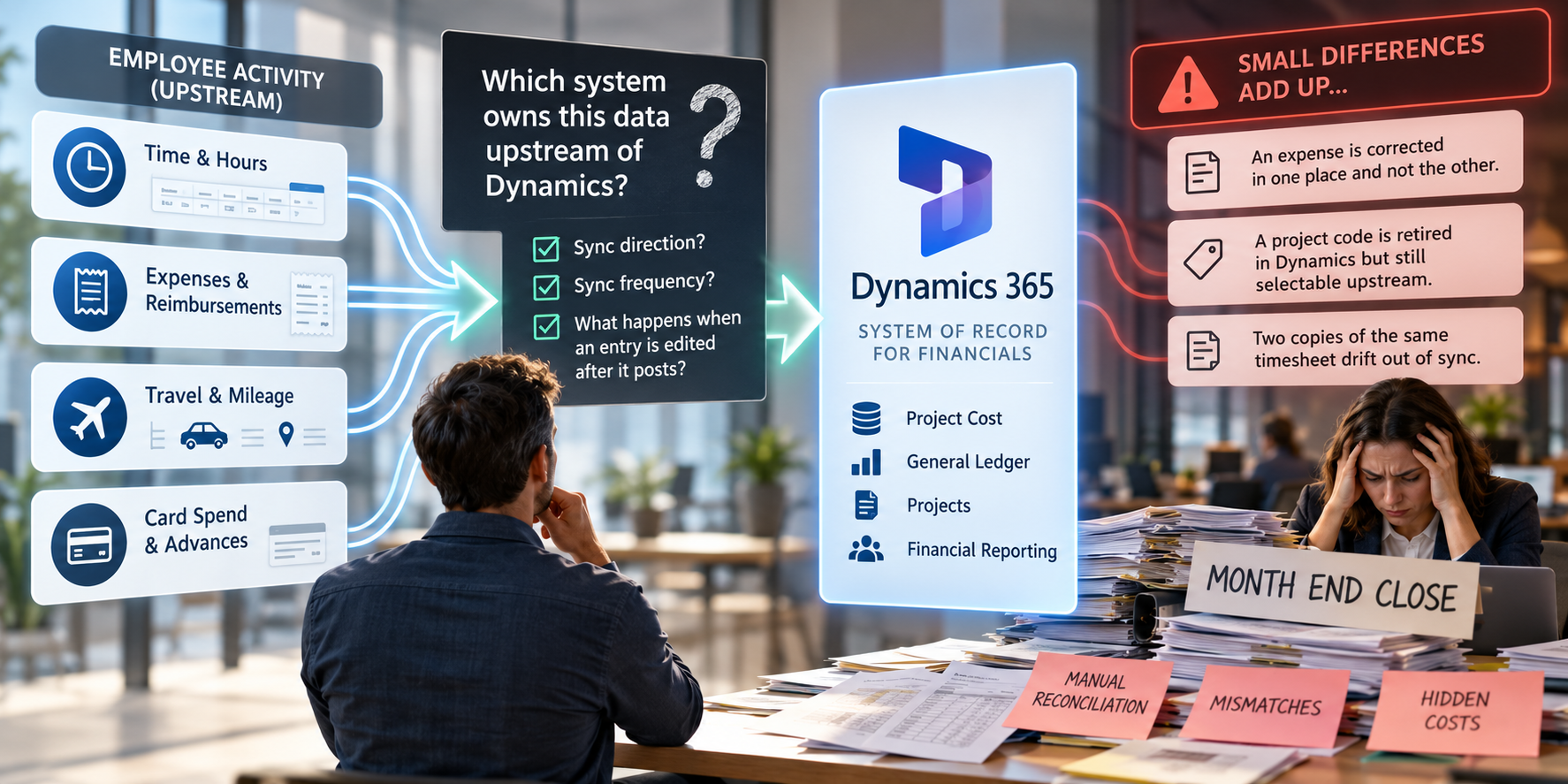 Dynamics should stay the system of record for your financials. The question is which system owns the employee activity upstream of it: the hours, mileage, travel, reimbursements, and card spend that become project cost. Decide that for each type of record (time, expense, leave, advances) before the demo, then make every vendor explain sync direction, sync frequency, and what happens when someone edits an entry after it posts to Dynamics.
This is the most expensive unresolved decision in most evaluations, and it rarely comes up on the floor because it isn't visual. When a standalone tool and Dynamics both hold a copy of the same timesheet, small differences accumulate. An expense is corrected in one place and not the other. A project code is retired in Dynamics but still selectable upstream. Nobody notices until close, when someone reconciles the two by hand.
A credible answer includes:
- A named master for each record type, stated plainly.
- Which fields flow in which direction, and how often.
- A written correction policy for entries edited after posting.
A credible answer also includes an honest account of what Microsoft now provides. Dynamics 365 Finance and Project Operations include expense management, with a mobile app that captures receipts. Business Central now has native expense management too, covering expense reports, per diem, mileage, rule validation, and approval workflows, with an optional Expense Agent that extracts data from receipts. Business Central's expense management and the Expense Agent for Project Operations are both listed on Microsoft Learn as production-ready previews, not generally available features. If your organization runs a single legal entity on Business Central or Dynamics 365 Finance with straightforward policies, the native tools may cover what you need, and any vendor who won't say that out loud isn't worth the meeting slot.
The case for a dedicated system of record gets stronger when you run multiple companies or currencies, different Dynamics products in different business units, DCAA-compliant timekeeping, or international VAT and per diem rules. Those are the conditions where a single master outside any one Dynamics instance earns its place.
Watch for "it syncs" with no direction, frequency, or error handling attached, and for native-tool demos that never reach a posted transaction.
Before Summit: list every system that holds a copy of time or expense data today. Include the spreadsheets.
3. Do your project, grant, and job dimensions reach the general ledger intact?
Ask the vendor to map one of your real projects, grants, or jobs, with your real dimension values, into your Dynamics structure while you watch. Ten minutes of a vendor typing your chart of accounts tells you more than an hour of slides.
Then make the test harder. Ask the vendor to code one hour of labor and one mileage claim to the same project, then show both arriving in Dynamics under the same dimensions. If time and expense come from separate tools, ask who reconciles them against the project, and when.
A mis-mapped dimension stays invisible until close, when someone reclasses journal lines by hand. The walkthrough should cover employee to worker, expense category to main account and dimension values, and project or task to your Dynamics project structure. Ask what happens when a project structure or dimension hierarchy changes mid-year, because it will. Validation should happen before posting, not as a reconciliation exercise after.
For government contractors, nonprofits, and public sector organizations, ask about capture at the grant and activity level and about DCAA compliance specifically. If the mapping lives in an Excel file outside the tool, that is a finding. "We'll configure that during implementation" is fine for configuration, but ask to see the capability now.
Bring to Summit: your chart of accounts and one real project structure.
4. What happens to a time or expense entry that fails validation?
"What happens to an entry that fails validation, and does an approver ever have to approve the same thing twice?"
 An entry that fails validation should stop before it posts, land in a queue that a named person owns, and never require anyone to approve it a second time. Dynamics should not be the place where finance first discovers a missing approval, a wrong project code, or an unmatched receipt.
When approval happens in one system and posting happens in another, three failures show up again and again. Approved entries get stuck in transit and nobody knows. Managers end up approving the same report in two places. And policy violations surface after the reimbursement has already gone out, when recovering the money is awkward for everyone.
Ask to see four things:
- Validation before transfer, with failures in a visible exception queue. A log file someone has to go read is not a queue.
- Status that syncs both ways: submitted, approved, rejected, and returned, with one system clearly the single point of approval.
- Safe retries. If a batch fails halfway and is sent again, nothing posts twice.
- Delegation and mobile approval for approvers who are traveling or out of office.
The best version of this conversation is short. Ask the vendor to break something: submit an entry against a closed project, or a corporate card transaction with no matching receipt, and show where it goes, who sees it, and how it gets resolved. If the answer is "users can check the log," or if nobody mentions retries, write that down.
Project cost allocation is where most of these failures start, so run the test against a project-coded expense rather than a simple reimbursement.
5. Who notices when the integration fails, and who fixes it?
Before go-live, name one owner for the integration on your side and one on the vendor's side, agree on a response time, and make sure failed or stalled transfers trigger an alert rather than a silent log entry. Silent failures surface as unreconciled spend at month-end, which is the most expensive place to find them.
Certification proves an integration exists. Monitoring and ownership decide whether it holds up in production. The timing matters this year: Microsoft's 2026 release wave 2 is scheduled to begin rolling out in October (although dates vary by application, capability, country, and region), according to the Dynamics 365 release schedule, which is ten days before Summit opens. Every integration you evaluate has to keep working through updates you don't schedule.
| What you may hear | What to ask for instead |
|---|---|
| "It's real-time, so it can't fail." | Show me what happens when the Dynamics endpoint is down during an update. |
| "We log every transfer." | Show me record counts and control totals per batch, and who gets alerted when a batch fails or stalls. |
| "Support handles that." | Name the owner on both sides and the response commitment in writing. |
| "Finance can see it in reporting." | Can Finance run the reconciliation report without asking IT for help? |
If ownership is still unanswered at signing, expect it to become the main problem in year two.
We hold ourselves to this question because DATABASICS sits upstream of Dynamics. Employees submit their time and expenses in DATABASICS. Our team configures the projects, grants, policies, and approval rules around how your organization operates. Approved data then moves through certified API integrations to Dynamics 365 Business Central and Finance & Operations, as well as GP, NAV, SL, and AX. Setup of the DATABASICS integration with Microsoft Dynamics typically takes a few weeks, depending on your configuration. Ask us every question in the table above.
Working through these seven questions before October 11? Bring them to DATABASICS at booth 1312. Meeting details are at the end of this post.

6. Can you answer an auditor without leaving the tool?
You should be able to show who approved a 2025 expense, when they approved it, and which version of the policy applied on that date, without exporting anything. Dynamics has its own audit features, but whatever sits upstream of the general ledger has to preserve the evidence auditors ask for.
Also check that receipt retention follows your schedule rather than the vendor's default, and that time and expense reporting arrives in one view rather than as two exports someone stitches together.
7. Who owns the time and expense system in year two?
Ask for an implementation timeline built on your fiscal calendar, a reference customer running your Dynamics product, and the name of the team you'll call 14 months after go-live. Implementation enthusiasm is easy to find on an expo floor. Year-two support is what you're actually buying.
Business Central and Finance & Operations are different integrations, and GP, NAV, and SL customers have their own lifecycle questions, so a reference on your stack matters more than a reference in your industry. Ask who validates the integration each April and October when Microsoft ships, and whether that work is included or billed. The implementation plan should name its dependencies: single sign-on, security roles, and how in-flight reports move over at cutover.
Ask for an adoption plan, not "the app is easy to use," and ask to see the implementation process in writing, including whether the people who implement you are the same people who support you afterward.
For an example of a Dynamics customer with compliance requirements, the Creative Associates case study covers how one international development organization brought time tracking, expense reporting, and Microsoft Dynamics together:

How should you run vendor meetings at Community Summit?
Send the seven questions ahead, run each meeting in three five-minute blocks, and score vendors the same day. Memory merges vendors by day two.
Before Summit
- Book meetings with your shortlist for the expo hall days, October 12 to 14.
- Email the seven questions in advance. Vendors who answer in writing before the floor opens have earned the slot.
- Bring your baseline numbers (question 1) and your chart of accounts (question 3).
On the floor
- Five minutes on your problem, with numbers. Five minutes on their evidence. Five minutes on a next step with a name and a date.
- Score each vendor right after the meeting, in the Whova event app or on a one-page scorecard like the one below.
| Question | A credible answer includes | Score (1 to 5) |
|---|---|---|
| 1. 2027 outcome | Your baseline metrics, a target, and a named owner | |
| 2. Source of truth | A named master per record type, sync direction and frequency, a correction policy | |
| 3. Dimensions | Your real project mapped live, time and expense on the same project structure, validation before posting | |
| 4. Exceptions | A visible exception queue, two-way status, safe retries | |
| 5. Monitoring | Failure alerts, control totals, named owners on both sides | |
| 6. Audit | Policy version at approval, your retention schedule, combined reporting | |
| 7. Year two | A reference on your stack, release-wave testing, a named support team |
After Summit
- Narrow to a shortlist within a week.
- Scope a pilot: one business unit, 60 days, measured against your question 1 baselines.
- Write a one-page readout for leadership: what you asked, what you heard, and what staying as-is costs.
Book a meeting with DATABASICS at Community Summit 2026:
DATABASICS provides certified timesheets & expense reports integrations for Dynamics 365 Business Central and Finance & Operations, plus GP, NAV, SL, and AX. Bring one real project, grant, or job structure to booth 1312. We'll show its labor and expenses coded, approved, and on their way to Dynamics. Then try our claw machine for a chance at a $150 gift card.
Frequently asked questions
What should I ask a Dynamics time and expense vendor at Community Summit 2026?
Ask seven operating questions: which outcome the data must deliver by 2027, which system is the source of truth, whether your project, grant, and job dimensions reach the general ledger intact, what happens to an entry that fails validation, who notices and fixes a failed integration, whether you can answer an auditor without leaving the tool, and who owns the system in year two. Each can be answered in a 15-minute expo conversation.
Does Business Central have built-in expense management?
Yes. Business Central now includes expense management covering expense reports, per diem, mileage, rule validation, and approval workflows, with an optional Expense Agent that extracts data from receipts. Microsoft Learn lists it as a production-ready preview as of September 2026. Dynamics 365 Finance and Project Operations have their own expense management. A third-party tool is worth evaluating when you run multiple companies or Dynamics products, need DCAA-compliant timekeeping, or manage international VAT and per diem rules.
How do you evaluate expense tools that integrate with Dynamics 365?
Test three things with your own data. First, which system masters each record and how corrections flow after posting. Second, whether entries that fail validation stop before posting and land in a queue someone owns. Third, whether failed or stalled transfers trigger alerts, with record counts and control totals Finance can reconcile without help from IT.
Who should own a time and expense integration after go-live?
Name one owner, usually finance operations or IT, before go-live, and write down the vendor's matching support contact and response commitment. That owner validates the integration each time Microsoft ships a release wave in April and October, reviews failed-transfer alerts, and runs the reconciliation report at month-end.
Community Summit North America is an independent user-community event. Event details are from summitna.com as of September 2026. This post does not imply endorsement by Microsoft or the event organizers.