

Updated August 27, 2026: The right time capture method depends on how the work happens. A shared time clock fits hourly employees who report to a fixed site. Mobile punch fits employees who move between locations. Timesheets fit people who need to allocate hours to projects, clients, grants, or cost codes. A mixed workforce may need more than one method.
Choosing the software is only part of the decision. You also need to decide how each employee group should record time. A mismatch can create missed punches, weak project records, extra corrections before payroll, and resistance during rollout.
Use the comparison below to narrow the choice. Then confirm that the platform can support the approval rules, audit history, and downstream data your organization requires.
Shared Time Clock vs. Mobile Punch vs. Timesheet
Shared Time Clock
Employees punch in and out from a shared device at a workplace or job site. Time is recorded when the punch happens rather than reconstructed later.
Real-time / Shared locationMobile Punch
Employees punch in and out from a phone or mobile device. Depending on the platform and configuration, the record may include location or confirmation controls.
Real-time / Location-flexibleTimesheet
Employees enter time against projects, tasks, clients, grants, or cost codes. The record shows not only how long someone worked, but where the hours belong.
Project-coded / Allocation-focusedWhen a Shared Time Clock Is the Best Fit
A shared time clock is usually the clearest fit when hourly employees begin and end work at a consistent location. It gives managers and payroll teams a time-stamped record without asking employees to recreate their hours at the end of the day or week.
Best for fixed-site, shift-based work
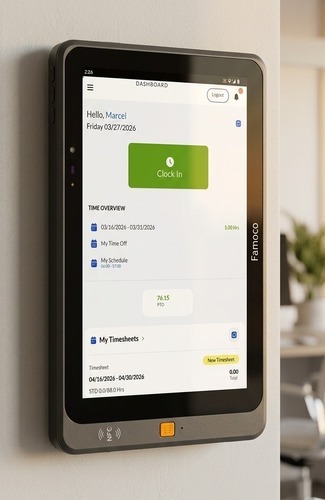 A shared device can make the punch process consistent for employees who report to the same facility or work area.
When Mobile Punch Is the Best Fit
Mobile clock-in and out fits hourly employees whose work location changes. It preserves the punch-in and punch-out model without requiring a terminal at every client site or job location.
Best for distributed, hourly work
 Mobile punch brings real-time capture to employees who work away from a central facility.
When a Timesheet Is the Best Fit
A timesheet is the better fit when the organization needs to know where hours went, not only when work started and stopped. Employees can allocate time to the projects, clients, grants, activities, or cost codes used by finance and operations.
Best for project, billing, and cost allocation
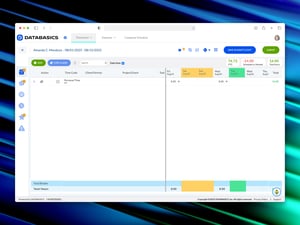 Timesheets connect hours to the work that created them. That distinction matters when labor data feeds billing, project accounting, grant reporting, or internal cost analysis.
Can One Organization Use More Than One Method?
Yes. A mixed workforce may have different capture needs. Warehouse employees might use a shared time clock, field employees might use mobile punch, and project-based staff might complete timesheets.
The key evaluation question is whether the proposed platform and configuration can apply the right rules to each employee group while giving managers, payroll, and finance a consistent approval and reporting process. Confirm that capability with the product team before treating it as a requirement the platform satisfies.
What to Check Before Choosing a Method
1. What record does payroll need?
If payroll primarily needs the beginning and end of a shift, a punch method may be enough. If payroll or finance also needs project, client, grant, or cost-code detail, the workflow may need timesheet allocation as well.
2. Where does the employee actually work?
A fixed-site employee and a field technician should not be forced into the same capture process merely because they share a payroll system. Match the interface to the work setting.
3. Which controls are appropriate?
Location data, facial confirmation, punch restrictions, edit history, approval rules, and locked periods can affect employees and compliance obligations. Verify the available controls, decide which are necessary, and have the policy reviewed before rollout.
4. Where must approved time go next?
Map the complete handoff into payroll, billing, project accounting, or the ERP. Ask vendors to demonstrate the actual fields, mappings, approval status, corrections, and exception handling your configuration will use.
5. Who corrects an exception?
Missed punches and miscoded time will still happen. Define whether the employee, manager, payroll team, or finance team owns each correction and what the audit history will show.
Common Evaluation Mistakes
Choosing one method for everyone. A uniform interface may look simpler, but it can shift complexity onto employees, managers, or payroll when the workforce is not uniform.
Treating an integration as a checkbox. Ask the vendor to show how time fields, project codes, approvals, corrections, and exceptions move into your downstream system. The name of an integration alone does not establish how it works in your configuration.
Ignoring the approval workflow. Map who approves shift time, project time, corrections, and exceptions before selecting the capture method.
Leaving HR, payroll, or finance out of the decision. Time capture affects employee policy, payroll operations, project or billing records, and oversight. The people who own those handoffs should review the proposed workflow.
Frequently Asked Questions
What is the difference between a shared time clock, mobile punch, and a timesheet?
A shared time clock records punches from a common device at a workplace. Mobile punch records punches from a phone or mobile device. A timesheet records hours against projects, clients, grants, tasks, or cost codes.
Should employees punch in on a shared tablet or use their phones?
Use a shared device when employees report to a consistent location and a common punch point is practical. Consider mobile punch when employees begin work at different sites. Also account for device policy, privacy, connectivity, accessibility, and workforce acceptance.
Can we use more than one time tracking method?
A mixed workforce may need more than one method. Confirm that the platform can assign appropriate methods and rules by employee group while supporting the approvals and reporting your organization needs.
How can we reduce buddy punching?
Start with clear policy and manager oversight. Depending on the product and configuration, punch restrictions, location controls, or facial confirmation may add another check. Review any employee-monitoring control with HR and legal before use.
Is mobile GPS time tracking enough for payroll compliance?
GPS can show where a punch occurred, but location data alone does not establish compliance. Requirements depend on jurisdiction, policy, recordkeeping, approvals, corrections, and how the system is configured. Get legal guidance for your specific obligations.
Do we need a physical or shared time clock if we already use timesheets?
Not necessarily. A shared clock may help when part of the workforce needs real-time shift punches, while timesheets remain appropriate for project allocation. Base the decision on employee groups and required records rather than on a single company-wide rule.
The Bottom Line
Use a shared time clock for fixed-site hourly work, mobile punch for distributed hourly work, and timesheets when hours must be allocated to projects, clients, grants, or cost codes. If your workforce includes more than one of those patterns, evaluate whether one platform can support the required methods, controls, approvals, and downstream data without creating manual reconciliation.
Explore DATABASICS Shared Time Clock
See the time capture option for teams that need a shared clock-in point, then decide whether a product walkthrough is the right next step.
View Shared Time Clock