


Corporate card reconciliation has a reputation for being tedious. That reputation is earned. According to the American Productivity and Quality Center, finance teams spend an average of 6.1 days on month-end close, and manual expense processes are among the biggest drivers of that number. Most of that time is recoverable.
The problem is not volume. It is the gaps: the receipt that came in three days after the charge, the GL code entered wrong, the statement that does not match the system balance because a transaction import ran twice. Fix the gaps, and reconciliation takes hours instead of days.
Step 1: Get transactions into your system automatically
Corporate card reconciliation starts the moment a transaction posts. If your process begins when a statement arrives at the end of the month, you have already created a backlog.
The right approach is a direct transaction feed from your card program to your expense management system. Not a CSV your card administrator downloads and uploads. A live connection that posts each transaction to the expense platform within 24 hours of it occurring.
With the DATABASICS Visa® Commercial Card, transactions post directly into DATABASICS Expense. The cardholder sees the charge, the finance team sees it, and the reconciliation clock starts the same day. There is no import step because the card and the expense system are the same product.
For organizations using a third-party card, DATABASICS Expense also connects to external card feeds. But a native card integration is tighter, because the GL coding rules, spend controls, and approval routing are configured in one place rather than mapped across two systems.
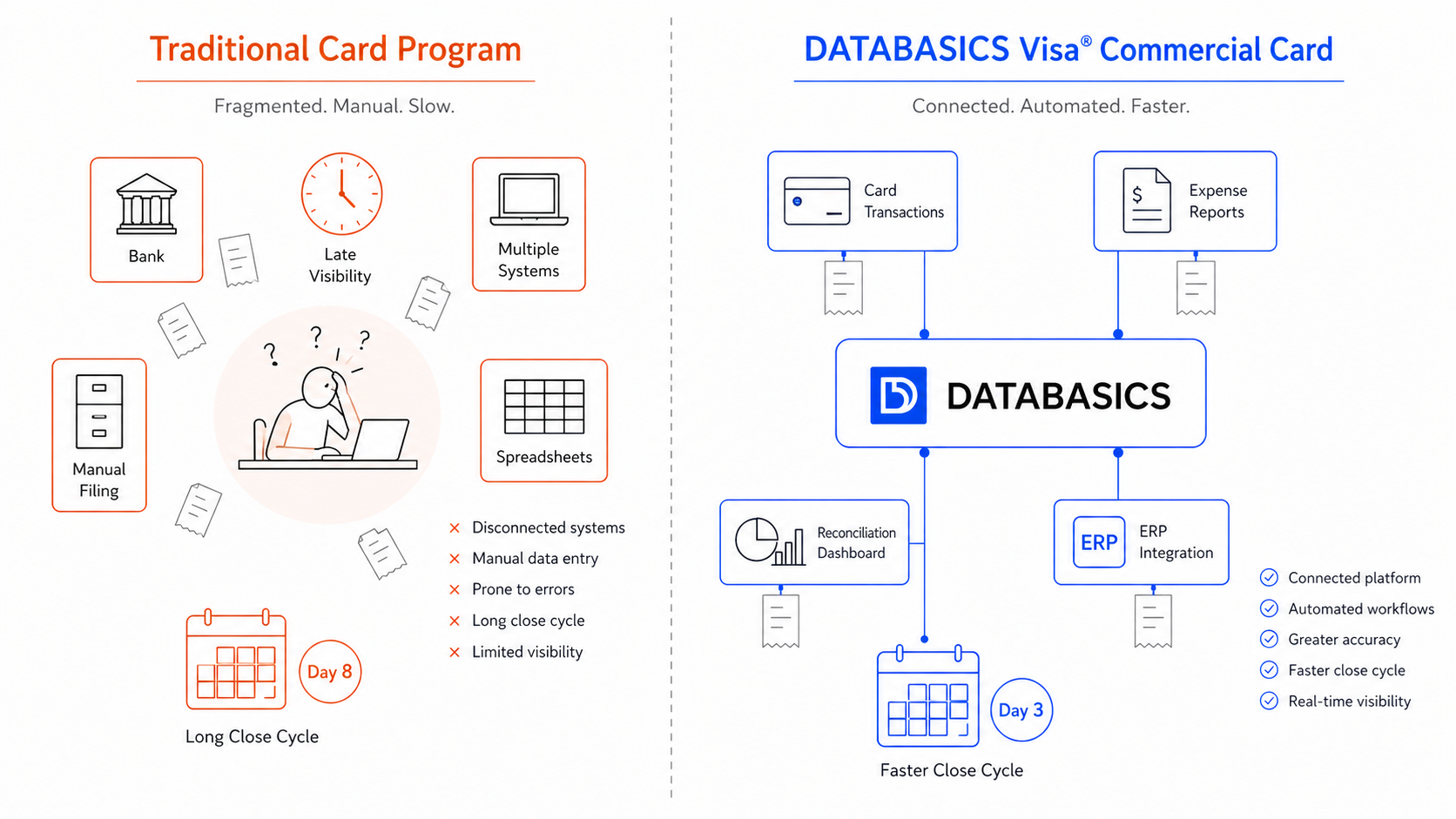
Real-time transaction feeds mean every charge is visible the day it posts, not at month-end.
Step 2: Match receipts before the period closes
Missing receipts are the single most common reason corporate card reconciliation drags. A cardholder makes a purchase on the 3rd, the receipt sits in their inbox, and by the 28th it is nowhere to be found.
Automated receipt matching changes the timing. When a transaction posts, the cardholder gets a notification. They take a photo, forward the email receipt, or text it. The system matches the receipt to the transaction immediately, using the amount, date, and merchant to confirm the pair.
DATABASICS Expense handles this through AI-powered matching. A receipt comes in, a transaction is waiting, they pair without manual review. If there is no match because the amount differs or the receipt predates the transaction, it goes to a reconciliation queue where an administrator resolves it.
The receipts are attached before the period closes because cardholders submit them throughout the month, not during a two-day sprint at month-end.
Transactions with no receipt attached after a configurable number of days generate an automatic reminder. The goal is to arrive at period end with almost nothing in the unmatched queue.
Step 3: Apply GL coding and policy rules at the transaction level
GL coding is where most of the manual reconciliation work actually lives. Someone looks at a meal charge, decides it belongs in entertainment versus travel, and enters the code. Multiply that by 200 cards and you have a full-time job.
Rule-based GL coding eliminates most of that work. You configure rules once: all transactions at merchant category code 5812 (restaurants) code to account 6210. All fuel charges code to 6310. Per diem charges at approved hotels code to 6100. The system applies them automatically to every matching transaction.
Exceptions still happen. An employee uses a card at a merchant outside a standard category, or a charge spans multiple cost centers. Those exceptions surface in a review queue with the suggested coding prepopulated. The reviewer confirms or changes it and moves on.
Policy enforcement runs in parallel. Spend limits by category, merchant blocklists, day-of-week restrictions, and per diem caps are all configured in DATABASICS. When a transaction violates a rule, it flags before it routes to an approver, not after it has already posted to the books.
Step 4: Route for approval through your actual org structure
Approval workflows for corporate cards should reflect how your organization actually works. A field team with 50 cards may need department-level approval under a threshold and finance review above it. A government contractor may need project-code validation before any charge routes for approval. A nonprofit with grant funding needs cost center alignment on every transaction.
In DATABASICS, approval routing is configured by department, cardholder, spend threshold, and card type. Approvers see the transaction, the matched receipt, the GL code, and any policy flags in a single view. They do not need to hunt for supporting documentation because it is all attached.
Approvals sitting in a queue past a configurable deadline generate a reminder. One stuck approval can hold up an entire period, so this matters more than it looks.
Step 5: Export clean data to your ERP
Reconciliation is not done until the approved data is in your accounting system. This is where many organizations still do manual journal entries, pulling approved expenses out of one system and keying them into another. That handoff is where transposition errors enter and where the audit trail breaks.
DATABASICS has native integrations with Sage Intacct, Microsoft Dynamics 365, and Oracle NetSuite, along with connections to SAP, ADP, and other major accounting and payroll systems. Approved transactions export mapped to the right GL accounts, dimensions, and cost centers. The export is timestamped, logged, and reversible if a correction is needed.
Month-end close for corporate cards becomes a confirmation step. The work happened throughout the month. The close is just the verification.
See the reconciliation workflow in your ERP
DATABASICS Visa® Commercial Card integrates natively with Sage Intacct, NetSuite, and Dynamics. Book a 30-minute demo to see your specific workflow.
Book a DemoWhere corporate card reconciliation goes wrong
The steps above are not complicated. Reconciliation stays broken at most organizations because the card program and the expense system are disconnected. Transactions live in one place, receipts in another, GL coding in a spreadsheet, and approvals in email. By the time month-end arrives, reconciliation is a detective job.
Four specific failure points account for most of the pain:
- Late receipts. Cardholders submit in a batch at month-end instead of at the point of purchase. Automated receipt prompts catch this the day it happens.
- Manual GL coding errors. When a person codes 200 transactions by hand, some are wrong. Rule-based coding removes human judgment from routine categorization.
- Duplicate imports. Running the same statement file twice is more common than finance leaders want to admit. Duplicate detection flags it before the entry posts.
- Statement timing gaps. Card statement cycles rarely align perfectly with accounting periods. Real-time transaction feeds close that gap by getting data into the system when the charge posts, not when the statement cycles.
Fixing all four requires a card program connected directly to the expense workflow. That is the design decision behind the DATABASICS Visa® Commercial Card.
What the DATABASICS Visa® Commercial Card includes
The DATABASICS Visa® Commercial Card is issued by The Bancorp Bank, N.A. (Member FDIC) pursuant to a license from Visa U.S.A. Inc. It is accepted everywhere Visa commercial cards are accepted.
The program offers three card types:
- Charge card. A line of credit up to $2 million in purchasing power, with 1% cash back on all eligible purchases. Used for back-office and vendor spend, employee travel, and general purchasing.
- Pre-funded card. Loaded via ACH or wire transfer, with 1% cash back on vendor spend. Used for field spend, per diem, and petty cash replacement.
- Disburse card. Pre-funded, for employee incentives and grant disbursement where spend is restricted to a specific amount and purpose.
All three share the same spend control framework: per-category limits, merchant whitelists and blocklists, day-of-week restrictions, state-based spend rules, and real-time transaction visibility. Controls are set at the cardholder, department, or program level. Transactions from all three card types post into DATABASICS Expense automatically, so the reconciliation process is identical regardless of which card type issued the charge.
Frequently asked questions about corporate card reconciliation
Five steps, in order:
- Import transaction data from your card provider, daily or in real time.
- Match each transaction to a receipt, manually or through automated matching.
- Apply GL codes and flag policy violations.
- Route expense reports through an approval workflow.
- Export approved data to your ERP or accounting system.
Automated tools handle all five steps in a single platform, replacing the spreadsheet-based process most teams still rely on.