

Corporate cards only eliminate manual expense reports when they're connected to policy enforcement and your ERP from the start.
Corporate cards (virtual or physical) don't fix expense reporting on their own. A card is just a payment method. What eliminates manual expense reports is the combination: cards issued with pre-configured spending rules, transactions captured and categorized automatically, and approved spend pushed directly to your ERP with the right GL codes.
When those three pieces connect, employees stop filing expense reports. Finance stops chasing receipts. Month-end close stops waiting on reconciliation.
Why don't most corporate card programs eliminate manual expense reports?
Most organizations that issue corporate cards still run manual expense reports six months later. The cards reduced reimbursement volume, but finance is still manually categorizing card transactions, still chasing receipts for purchases over $25, still manually coding charges into the ERP at month-end.
The gap is almost always the same: the card program and the expense reporting software were set up separately, with no direct connection between spend controls and GL coding.
A card that lets an employee buy anything, anywhere, at any amount generates a transaction file. Someone still has to turn that transaction file into a properly coded journal entry. Without policy enforcement at the card level and automated ERP coding on the back end, you've replaced the reimbursement check with a different kind of manual work.
According to the GBTA Foundation, processing a single expense report costs finance teams around $58 and takes approximately 20 minutes. One in five reports contains an error, adding another 18 minutes and $52 per correction. For a 200-employee organization running 400 reports per month, that's 133 hours in processing alone, before a single error is touched.
What does a corporate card program that actually eliminates expense reports require?
Step 1: Issue cards with spending rules configured before the card is ever used
The most important design decision in a corporate card rollout happens before any card is issued: defining what each card can and cannot spend, at the card level, before the first transaction.
Modern card platforms support controls including:
- Spending limits by transaction, day, month, or category
- Merchant category restrictions (IT software only, travel and meals only, no retail)
- Geographic restrictions for domestic-only programs
- Vendor-specific allowances or blocks
- Time-based controls (no weekend spend, business hours only)
- Single-use virtual cards that expire after one transaction
A finance director at a government contractor might configure the IT lead's virtual card with a $2,000 monthly limit, restricted to software and SaaS vendors. The field team gets physical cards limited to fuel and meals, capped at $75 per transaction. If a purchase falls outside those rules, the card declines it at the point of sale. No after-the-fact review required.
This is different from a spending policy document that employees are expected to read and follow. Policy enforcement at the card level means the system does the enforcing, not a monthly audit.
Step 2: Connect card transactions to your expense system automatically
When an employee uses a corporate card, that transaction should flow into the expense system the same day, ideally within minutes. The employee should see the charge, attach a receipt if required, and confirm any allocation details. They should not be building an expense report from memory at the end of the month.
For compliance-driven organizations, receipt capture matters. A Romark Laboratories user described it this way: "All of my credit card expenses are already pre-populated and all I have to do is upload my receipts."
That's the right experience. The transaction is already there. The employee confirms it and attaches documentation. Finance gets a complete, policy-validated record without chasing anyone.
For programs configured with strict merchant controls and low dollar thresholds, some transactions can be auto-approved without any employee action at all. The card only works where and how policy allows; the transaction codes itself based on the merchant category.
Step 3: Push approved transactions to your ERP with GL codes already applied
This is where most corporate card programs fail. Approved card transactions sit in the expense system and then require manual export, GL mapping, and journal entry in the ERP. That's the manual work that wasn't eliminated.
The right connection works differently. When a transaction is approved in the expense system, it posts to the ERP automatically, with the GL account, cost center, project code, and department already applied based on rules configured during setup.
For a nonprofit tracking grant allocations, that means a field employee's hotel charge codes to the correct grant automatically. For a government contractor, it means DCAA-required labor allocation detail arrives in Deltek Costpoint without a manual step. For a professional services firm, it means client-billable expenses hit the right project in NetSuite the same day they're approved.
DATABASICS connects directly with Oracle NetSuite, Sage Intacct, Microsoft Dynamics, Deltek Costpoint, SAP, and other major ERPs through direct ERP integrations. The connection is bidirectional: GL structure and project codes come from the ERP, approved transactions go back in.
How do you structure a corporate card rollout to avoid common configuration mistakes?
Define your card program architecture before issuing any cards
The most common rollout failure is issuing cards and configuring rules later. By then, employees have established habits and exceptions, and retroactive policy enforcement creates friction.
Before issuing cards, define:
- Which employees or roles get cards (and whether they get virtual, physical, or both)
- What spending limits apply by role, department, or use case
- Which merchant categories are allowed or restricted per card type
- Whether receipts are required for all transactions or only above a threshold
- What GL codes and cost allocations apply to each card type
- Which approvals are required before a transaction posts
This configuration work typically takes two to four weeks. It's not technically complex, but it requires collaboration between finance, department heads, and IT, specifically around how the GL mapping should work for each card category.
Issue virtual cards first, physical cards where they're needed
Virtual cards are easier to configure, issue, and control. They're issued instantly, can be limited to a single vendor or transaction, and can be cancelled without any physical card recall.
Physical cards make sense for employees who regularly make in-person purchases: field teams, facilities staff, employees who travel with cash-light vendors. For most desk-based spending (software subscriptions, online vendors, travel booked through a portal), virtual cards reduce fraud exposure and simplify reconciliation.
Many organizations issue virtual cards to all employees with spending authority, then add physical cards selectively based on actual need.
Connect your ERP during implementation, not afterward
ERP integration should happen during the initial setup, not after the card program is running. The reason is practical: GL codes, project codes, cost centers, and department structures need to be mapped before the first transaction posts. Retroactive re-mapping is messy and creates reconciliation problems.
DATABASICS implementation runs five to eight weeks for most mid-market organizations. ERP integration is configured during that window, tested with a small group before full rollout, and validated against a month-end close cycle before launch.
How virtual cards differ from physical cards for compliance-driven organizations
| Feature | Virtual Cards | Physical Cards |
|---|---|---|
| Issue speed | Instant | 5–10 business days |
| Per-transaction limits | Yes | Yes |
| Merchant restrictions | Yes (coded at card level) | Yes (coded at card level) |
| Best for | Online vendors, subscriptions, travel portals | In-person purchases, field spend |
| Fraud exposure | Lower (single-use options available) | Higher (card can be lost or stolen) |
| Cancellation | Instant | Requires card recall |
| DCAA audit trail | Yes (transaction-level detail) | Yes (transaction-level detail) |
| Receipt requirement | Configurable | Configurable |
Both card types generate the same transaction data and connect to the same expense system and ERP integration. The compliance and bookkeeping automation works identically whether you're issuing a DATABASICS Visa® Commercial Card or connecting an existing card program.
What does bookkeeping automation actually mean for a corporate card program?
The phrase gets used loosely. Here's what it means in a properly connected P-Card management program:
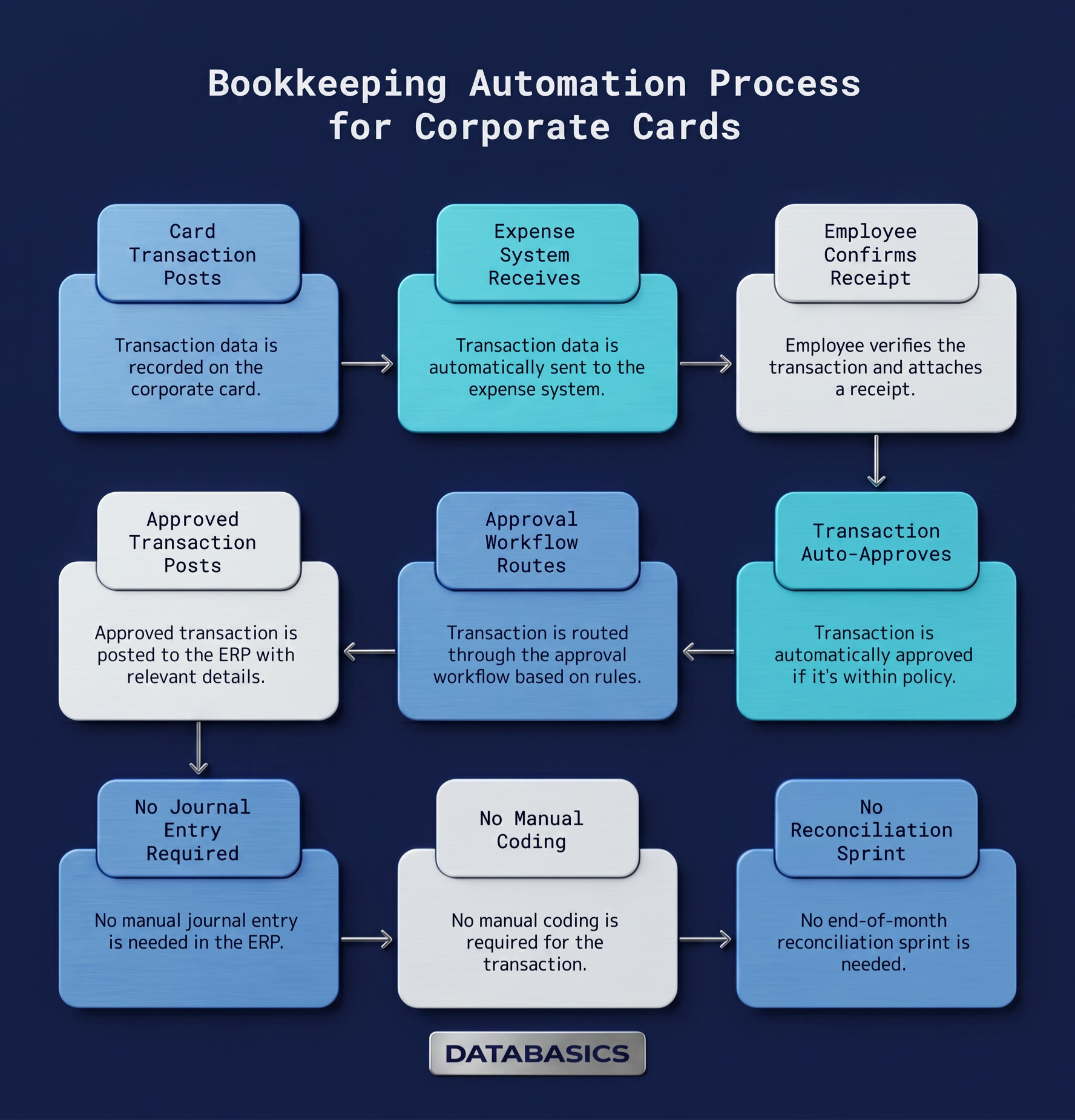 Card transaction posts → expense system receives it automatically → employee confirms and attaches receipt (or transaction auto-approves within policy) → approval workflow routes based on configured rules → approved transaction posts to ERP with GL code, cost center, project, and department already applied → no journal entry required, no manual coding, no end-of-month reconciliation sprint.
For a 200-employee organization, a properly configured program saves $58,000 to $90,000 annually in administrative expense, according to analysis of automated expense management implementations. More importantly for finance teams in compliance-driven industries, it produces an audit trail that exists in real time, not reconstructed from receipts and email threads after the fact.
Frequently asked questions about corporate card programs with automated controls
How long does it take to roll out a corporate card program with spending controls and ERP integration?
For most mid-market organizations, three to eight weeks from kickoff to full deployment. The timeline depends primarily on ERP integration complexity and how many distinct card types and approval workflows you need to configure. Government contractors with complex project coding structures or multiple contract vehicles typically take longer than professional services firms with simpler GL structures.
Can we keep our existing corporate card issuer and still automate the bookkeeping?
In many cases, yes. DATABASICS connects to existing Visa, Mastercard, and American Express corporate card programs through card feed integrations, so you don't necessarily need to switch card issuers to get transaction automation and ERP integration. The DATABASICS Visa Commercial Card is also available if a net-new card program is the right fit.
Does every transaction require employee action, or can some auto-approve?
It depends on configuration. Transactions that fall within policy (correct merchant category, within spending limit, no receipt threshold triggered) can be configured to auto-approve and post directly to the ERP without employee action. Transactions that fall outside policy parameters route to the appropriate approver. The ratio of auto-approved to manually reviewed transactions typically improves over time as GL mapping and policy rules are refined.
How does this work for DCAA compliance?
DCAA compliance requires a complete, contemporaneous audit trail: who incurred the expense, when, what it was for, which contract or project it belongs to, and who approved it. A properly configured card program produces that trail automatically at the point of transaction, not reconstructed at audit time. The project or contract allocation is captured when the employee confirms the transaction, not when someone manually codes a journal entry at month-end. DATABASICS is purpose-built for government contractors and compliant with DCAA audit requirements.
What happens when an employee makes a purchase outside policy?
If real-time card controls are configured, the purchase declines at the point of sale. The employee is notified and can request an exception through the approval workflow if the purchase is legitimate. If the card program uses post-transaction policy review rather than pre-authorization controls, out-of-policy transactions are flagged automatically in the expense system and routed to an approver before posting to the ERP.
How does grant tracking work for nonprofits with fund accounting requirements?
Each card transaction can be allocated to one or more grants, programs, or funds at the time of employee confirmation. That allocation maps directly to the grant coding structure in the ERP. In Sage Intacct's dimensional accounting, for example, approved expenses post to the correct fund without manual GL entry. For organizations with USAID or federal grant requirements, the audit trail includes allocation detail at the transaction level.
What DATABASICS is built for
This system works well for mid-market organizations, typically 50 to 500 employees, in industries where compliance matters: government contractors, nonprofits, CROs, professional services, construction, and healthcare.
If your organization needs DCAA-compliant audit trails, grant-level expense allocation, or expense data that arrives in your ERP correctly coded without manual intervention, this is the problem DATABASICS has been solving for 25 years.
Next step
See how DATABASICS maps to your card program, your ERP, and your approval workflow
Pricing is based on active users and module selection. See pricing plans before you book, or ask during the demo.
DATABASICS is a compliance-ready time and expense platform with native ERP integration. The company has received eight consecutive Stevie Awards for customer service. Implementation for mid-market organizations runs five to eight weeks.