


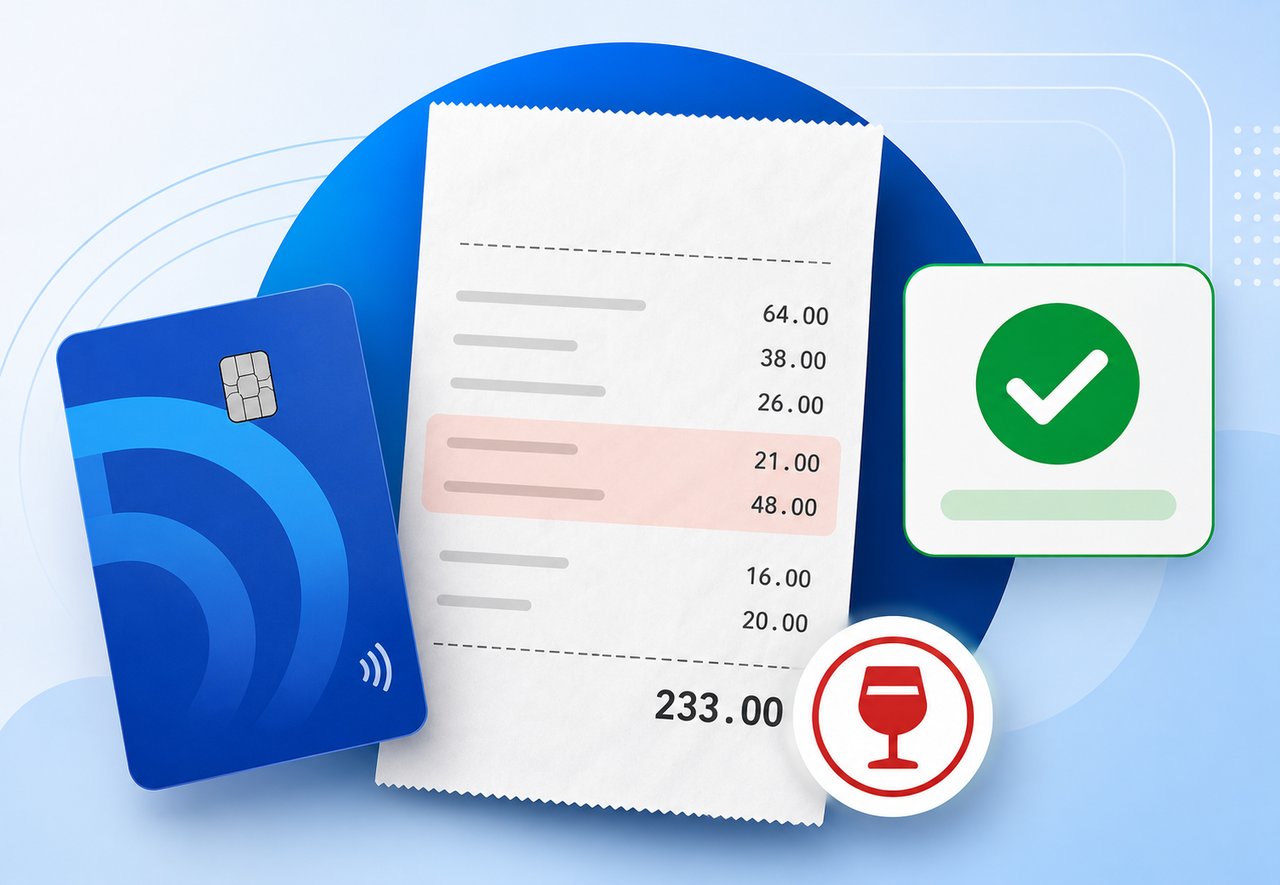


Expense reporting AI can help finance teams review receipts and expense lines faster, but the strongest workflows still rely on policy rules and human oversight for final control. That is the real question finance leaders are trying to answer now: where should AI help, where should rules still lead, and how do you keep the process accurate enough for approval and audit?
In practice, this is not an either-or decision. The best expense workflows use both. Policy validation handles the hard rules. AI handles the receipt-level review that is slower and more tedious for people to do manually. Human approvers still keep final oversight.
For DATABASICS, that balance is the point. AI Expense Approval is designed to work alongside existing approval structures rather than replace them. It adds a review layer to expense workflows so finance teams can catch receipt issues, itemization gaps, duplicate charges, category mismatches, and payment-type errors before a human approver spends time on them.
If you are evaluating the broader workflow, it helps to think about the full expense stack too: all-in-one time and expense software, ERP and accounting integrations, and the demo process that shows how these pieces fit together.
Proof in practice
The strongest examples from the workflow show what AI is actually useful for:
- A restaurant receipt that is not itemized enough to support the expense
- A meal receipt that includes alcohol when company policy does not allow it
- A receipt where the amount on the report does not match the receipt total
- A meal entered as gas, which should be flagged as a category mismatch
- A reimbursable expense that actually looks like a corporate card charge
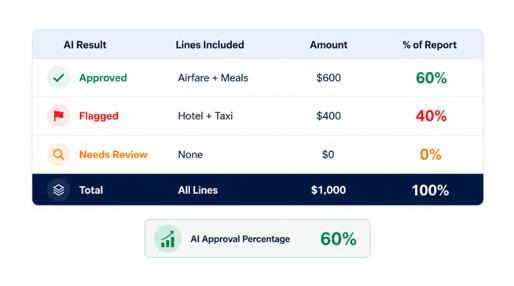
- A $1,000 report with $600 approved and $400 flagged, which produces a 60% approval score
What is expense reporting AI?
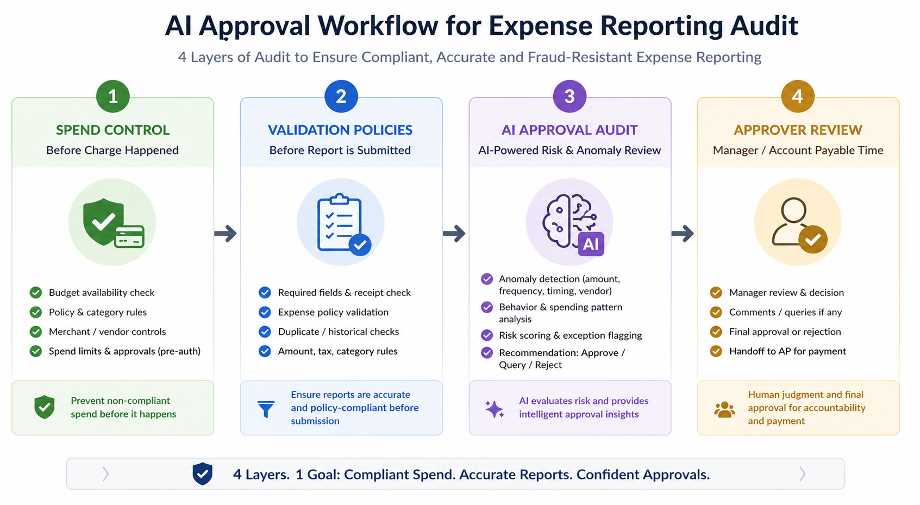 Expense reporting AI combines OCR, categorization, policy checks, and workflow automation to help finance teams handle expense review more efficiently.
At a basic level, it reads receipt data, compares that data to the expense line, and helps identify exceptions before a report reaches a human approver. That makes it more than receipt storage or simple expense capture. The value is in how it helps finance review spend faster and more consistently.
OCR is usually the starting point. It extracts the important details from the receipt, such as vendor, date, amount, and currency. From there, the workflow can compare those details against the report and the policy rules that apply.
What is AI expense approval?
AI expense approval is the decision layer that reviews expense lines and decides whether they can move forward, need review, or should be sent back.
It sits inside the approval workflow, not outside it. That matters because the goal is not to replace human approvers. The goal is to reduce the amount of repetitive checking they need to do.
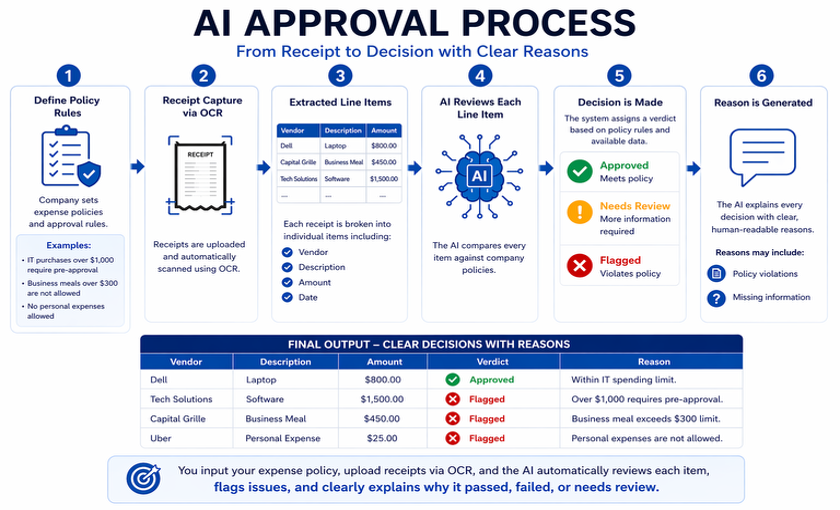
In DATABASICS, AI approval is one layer in a four-part workflow:
- Spend control
- Policy validation
- AI approval
- Final review
That structure is useful because not every check belongs in AI. Some rules are better handled before the report gets that far.
Why traditional expense workflows break down
Traditional expense workflows slow down when teams rely on manual receipt checks, email approvals, and inconsistent policy enforcement.
That creates delays for finance and frustration for employees, especially when the same issues keep showing up report after report. A receipt gets entered, a manager has to chase details, and finance ends up cleaning up the same problem later.
The problem is not just speed. It is also control, consistency, and auditability.
When expense volume grows, the weak spots become obvious:
- Manual review takes too long.
- Policy rules are not enforced the same way every time.
- Finance sees issues too late.
- Employees get stuck fixing preventable mistakes.
- Audit trails are harder to maintain when the workflow lives in email threads and side conversations.
How expense reporting AI works
 The strongest expense workflows use three layers together: OCR, policy validation, and AI review.
OCR receipt scanning
OCR reads the receipt and extracts the important details. In a practical workflow, that means vendor, date, amount, currency, and other receipt fields that finance needs to compare against the report.
That data is useful only if it is paired with the next two pieces: policy rules and AI review.
Policy validation
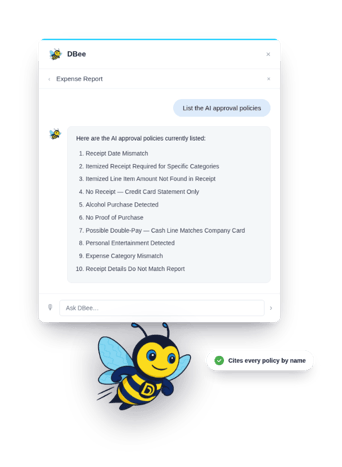 Policy validation is the right place for hard rules that do not need interpretation.
Examples include:
- Required receipts
- Duplicate charge checks
- Mileage limits
- Commute controls
- Per diem rules
- Attendee tracking
- Gift card limits
These are the kinds of checks finance should enforce before AI review, because the logic is clear and repeatable.
AI review
AI is most useful for the receipt-level checks that are harder or slower for people to review manually.
That includes:
- Itemization gaps
- Alcohol on a meal receipt
- Amount mismatches
- Date mismatches
- Payment-type mismatches
- Category mismatches
- Duplicate payment risk
This is where AI adds value without replacing the process. It helps humans spend time on exceptions instead of hunting through every line item. The rules that do not need interpretation still belong in policy validation:
- Required receipts
- Mileage limits
- Commute controls
- Per diem rules
- Duplicate charge checks
- Gift card limits
That separation matters because it keeps the workflow both fast and controlled.
AI vs rules-based automation in expense reporting
The difference between AI and rules-based automation is simple:
- Rules handle fixed policy.
- AI handles less predictable review work.
The strongest expense workflow uses both.
Here is a practical way to think about it:
- Hard rule - rules-based automation
- Receipt review - AI
- Duplicate charge threshold - rules-based automation
- Itemization check - AI
- Per diem limit - rules-based automation
- Payment-type mismatch - AI
This is why a finance team should not think about AI as a replacement for policy logic. It is a layer that helps cover the review work that rules alone do not handle well.
| Expense Task | Best Fit | Why |
|---|---|---|
| Required receipt checks | Rules-based automation | The rule is fixed and easy to enforce before approval. |
| Mileage and commute limits | Rules-based automation | These are clear policy thresholds, not judgment calls. |
| Per diem limits | Rules-based automation | The policy can be defined in advance and applied consistently. |
| Itemization review | AI | AI can inspect the receipt details and flag unclear or incomplete support. |
| Alcohol detection on meal receipts | AI | The receipt content itself matters, so AI can help review it faster. |
| Payment-type mismatch | AI | AI can compare the receipt, payment method, and report context. |
| Duplicate charge review | Both | Rules can catch known thresholds, while AI can help spot patterns or inconsistencies. |
| Final approval | Human review | Human approvers still need to make the final call on exceptions. |
Review the AI Expense Approval product page for workflow detail, then look at Dbee for the broader product experience.
What happens when AI flags a report?
When AI flags an expense line, the user should be able to fix the issue inside the workflow instead of going back and forth by email.
 That may mean:
- Adding notes
- Attaching documentation
- Changing the expense data
- Explaining the purchase more clearly
This keeps the issue visible and actionable. It also gives the approver better context when the report comes back through the workflow.
Why this matters for finance teams
The benefit of expense reporting AI is not just automation. It is better control with less manual effort.
For finance teams, that usually means:
- Less manual rework
- Faster review cycles
- Cleaner submissions
- Better audit trails
- More consistent policy enforcement
- Better employee experience
The operational effect is simple. Finance spends less time checking routine exceptions and more time on the issues that actually need judgment.
What to look for in an AI expense solution
If you are evaluating AI expense tools, focus on the workflow, not just the label.
Look for:
- OCR and receipt scanning
- Configurable policy rules
- Threshold-based routing
- Audit trail support
- Human oversight
- Security and governance
- ERP and accounting integrations
- Clear explainability
The right solution should support both policy validation and AI review. It should not force you to choose one or the other. If you want to compare how the workflow connects to the rest of your finance stack, ERP and accounting integrations are part of the evaluation too.
FAQ
What is expense reporting AI?
Expense reporting AI combines OCR, categorization, policy checks, and workflow automation to help finance teams review expense reports more efficiently.
What is AI expense approval?
AI expense approval is the decision layer that reviews expense lines and decides whether they can move forward, need review, or should be sent back.
Can AI automatically approve expense reports?
Yes, but only when the report meets the configured score or threshold. In a good workflow, AI can approve low-risk items, flag exceptions, and route the rest for review.
What can AI catch in an expense report?
AI can catch itemization gaps, alcohol on a meal receipt, amount mismatches, date mismatches, payment-type mismatches, category mismatches, and duplicate payment risk.
What is the difference between AI approval and policy validation?
Policy validation handles hard rules like required receipts, mileage limits, commute controls, and per diem rules. AI handles the receipt-level review that is harder to inspect manually.
Does AI replace human approvers?
No. Human approvers still keep final oversight. AI is there to reduce repetitive checking and help route exceptions faster.
How does OCR support expense reporting AI?
OCR reads the receipt and extracts the important details, such as vendor, date, amount, and currency, so the system can compare them against the report.
How does the system handle flagged reports?
Users can correct flagged items with notes, documentation, or data changes before the report proceeds.
Is AI expense reporting secure?
Security should be part of the evaluation. Buyers should look for governance, audit trail support, and integration controls before rolling out AI review.
Those answers are the questions that separate a useful AI workflow from a flashy feature list.
When DATABASICS is a good fit
DATABASICS is a strong fit when finance needs workflow control, not just receipt capture.
It is especially useful when:
- Policy validation and AI need to work together inside the same approval flow.
- Human approvers still need final oversight.
- The team wants to reduce manual checking without losing control.
- The workflow needs to stay flexible enough to route exceptions differently based on thresholds or policy.
That balance is the point. DATABASICS is not trying to replace finance controls. It is designed to work alongside them.
See how DATABASICS handles AI expense approval in practice.
Expense reporting AI should help finance teams work faster without giving up control. Rules-based automation should still handle hard policy logic, and human approvers should still make the final call.
DATABASICS AI Expense Approval is built around that balance. It gives finance teams a way to review receipt-level exceptions faster, keep policy enforcement consistent, and move reports through the workflow with more confidence.

There’s a New Chief at Work: How AI Changes Compliance
Read Now
Best expense management software for construction field crews (2026)
Read Now
Timesheets and Expense Reporting Software: The Top Questions We Hear From Buyers
Read Now
Best DCAA timesheet software for government contractors (2026)
Read Now
Expense Reporting Compliance: Policy to Audit Trail
Read Now
From Timesheet to Audit Trail: Building Compliance Into Time Reporting
Read Now
