


Choosing a timesheet & expense reporting system is one of those decisions that sounds straightforward… until the real work of rollouts, integrations, and adoption begins.
Pick the wrong platform, and you’ll face hidden admin costs, patchy reporting, broken month-end closes, frustrated approvers, and expensive re-implementations.

According to Gartner's Digital Markets 2024 Tech Trends report, 60% of B2B software buyers regret their purchase within 12-18 months.1 More concerning, Capterra's 2024 Tech Trends survey found that more than half of companies experienced considerable financial loss from a software purchasing mistake.2
This guide helps you avoid those pitfalls. Keep reading to learn:
- The hidden costs that emerge after go-live
- Non-negotiable features that separate enterprise-ready from basic tools
- How to structure your evaluation process
- Who needs to be involved (and why skipping stakeholders backfires)
- Questions that expose vendor weaknesses during demos
- What makes certain vendors stand out compared to others (hint: customer support is more important than you think!)
2https://www.capterra.com/resources/us-tech-trends/
Why Many Companies Regret Their Expense Reporting or Time Tracking System

The most common problems are often ones that are discovered after go-live, when it's expensive to switch. These include:
1. Poor Integrations
- The problem: When expense or time tracking data won’t flow cleanly into ERPs, payroll, or accounting systems, the reconciliation burden grows and month-end drags on.
- What this looks like: Finance exports CSVs from the T&E system, manipulates them in Excel, then imports to the ERP. Payroll re-keys overtime hours. Month-end close takes 3-4 extra days.
-
Red flag in demos: Ask "Show me the actual data that flows to [your specific ERP], not a sample report, but the integration file format." Vague answers indicate weak integration.
2. Rigid Approval Workflows
- The problem: Systems with fixed approval paths become maintenance nightmares when your organization reorganizes, adds new cost centers, or changes project structures.
- What this looks like: Every time you restructure, you need expensive professional services to reconfigure workflows. Approvals get stuck because the system can't handle matrix management or temporary reassignments.
- Red flag in demos: When vendors say "our workflow handles most common scenarios" or "we can customize that for you," customization often means ongoing costs.
3. Limited Real-Time Tracking
- The problem: Manual or semi-manual processes often mean finance is working off stale spreadsheets, not live transaction feeds.
- What this looks like: A project manager asks "are we over budget on the Johnson project?" and finance responds, "I'll pull that report and get back to you tomorrow." By then, you've already overspent by thousands.
4. Hidden Administrative Costs
- The problem: Receipt chasing, manual re-categories, and help desk tickets consume finance hours that should be spent on analysis and forecasting.
- Reality check: Add up these costs:
- How many hours/month does finance spend on receipt follow-up? _______
- How many expense reports get kicked back for corrections? _______
- How many IT tickets are T&E-related? _______
- How much time in month-end reconciliation? _______
Multiply by hourly cost. That's your hidden cost of ownership.
5. Underestimating Implementation Complexity
- The problem: Vendors quote implementation timelines based on their simplest deployments. Your reality includes legacy data migration, complex approval matrices, union rules, grant compliance, and integration with customized systems.
- Software buyers commonly underestimate rollout complexity and downstream costs. In fact, buyer’s remorse for enterprise software is common, so it’s important to understand what your platform should deliver.
Key Features to Look For in a Timesheet & Expense Reporting Solution
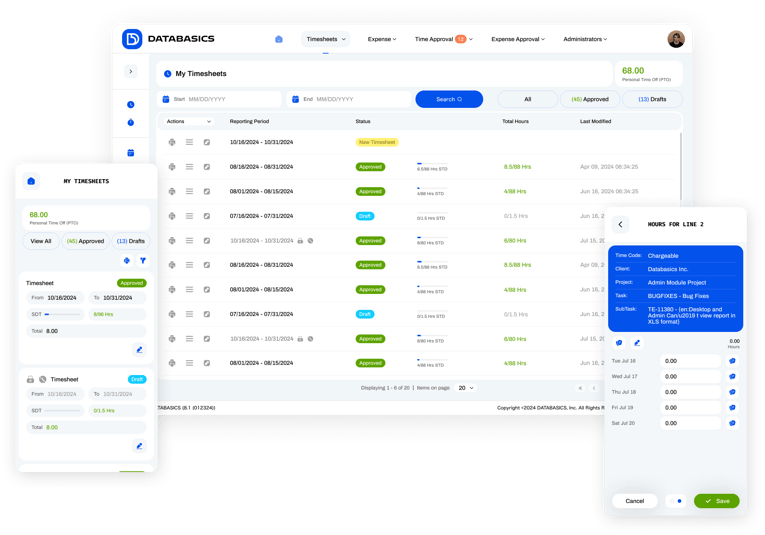
When you’re weighing your options, here are some features that should form the non-negotiable part of your shortlist criteria:
Flexible Workflow & Approval Configuration
You don’t want to shoehorn your process into someone else’s ideal flow. Your T&E platform should allow you to create custom approval paths based on department, amount, or card type.
Flexibility looks like:
- Approval routing based on: department, amount, expense type, project, location, employee level
- Matrix approvals (e.g., both project manager AND finance must approve)
- Temporary reassignments (employee A approves while manager B is out)
- Delegation without breaking audit trails
- Exception workflows (different path for out-of-policy expenses)
How to test during demo: "Show me how I would change approval workflow when we reorganize next quarter. Can I do this myself?"
Mobile Receipt Capture & Automation
Look for platforms where employees can submit receipts via mobile app or email, and where AI or rules-based systems match those receipts to transactions automatically.
What mobile should include:
- Receipt capture: Photo upload with OCR that auto-populates amount, merchant, date
- Mileage tracking: GPS-based automatic logging
- Approval from mobile: Managers shouldn't need desktops to approve
- Policy alerts in real-time: "This hotel exceeds per diem" before they book
How to test during demo: Have them demo the actual mobile app, not just screenshots. Try it yourself. Is it genuinely intuitive?
Integrations with ERP, HRIS, & Card Programs
Your expense tool should sync natively or via robust connectors to your accounting system, HR platforms, and the cards your teams use. Integration is critical to a smooth close and accurate forecasting.
What to verify:
- Employee master data syncs (hires, terminations, cost center changes)
- Chart of accounts updates automatically
- Project/grant codes stay in sync
- Approved expenses flow to AP without re-entry
- Time data flows to both payroll AND project costing
- Card transactions auto-import and match to receipts
How to test during demo: "Walk me through exactly what happens when an employee's cost center changes in our HRIS. Show me the data that would flow to our ERP for this expense report."
Real-Time Visibility & Reporting
Look for live dashboards, searchable transaction feeds, and ad-hoc reporting. Real-time data lets finance detect anomalies early and make better budgeting decisions.
Must-have reporting capabilities:
- Live dashboards: Current spend by project, department, employee
- Ad-hoc queries: "Show me all meals >$100 in Chicago last month"
- Variance alerts: "Project X is 15% over labor budget"
- Compliance reporting: DCAA, grant reporting, per diem compliance
- Export flexibility: Push data to your BI tools (Power BI, Tableau)
- Natural Language Queries: Search using Chat or AI to find quick answers.
What separates good from great:
- Can non-technical users build reports?
- Can you schedule automated reports to stakeholders?
- Can you drill down from summary to transaction detail?
- Do reports include both time and expense data together?
Global & Compliance Capabilities
If you operate internationally, your solution should handle multi-currency transactions, per diem rules, VAT/GST handling, and country-specific compliance needs.
For international operations:
- Multi-currency expense entry and conversion
- Country-specific per diem rates and tax rules
- VAT/GST tracking and recovery
- Local statutory reporting
- Multi-language interface
For government contractors & grant-funded organizations:
- DCAA compliance (audit trails, labor distribution, unallowable costs)
- Grant accounting (award restrictions, indirect vs. direct costs)
- Time-to-award allocations
How to test during demo: "Show me how your system handles [your specific compliance requirement]. What reports would I provide during an audit?"
Policy Enforcement That Prevents Mistakes
Instead of punishing users after the fact, a modern system should enforce rules at the point of spending. Merchant restrictions, spend limits, and virtual-card controls reduce fraud and out-of-policy charges.
Policy controls to verify:
- Spending limits by employee level, department, or project
- Merchant category restrictions (prevent charges at casinos, liquor stores, etc.)
- Receipt requirements by amount
- Virtual cards with single-use limits
- Automatic flagging of duplicate expenses
Customer Support That Actually Supports The Customer
Why Support is a Non-Negotiable Feature
The true cost of a system isn't just the license fee; it's the cost of downtime and administration. A timesheet or expense reporting system is mission-critical: if it fails, employees don't get reimbursed, payroll doesn't run, and month-end closes stop.
Essential support features to verify:
- Timely Problem Resolution: Your finance team can't wait 48 hours for a support ticket response when GL data won't flow. Look for vendors who offer immediate, live support options (phone/chat).
- Expertise in Complex Workflows: When you encounter an issue involving a unique compliance rule (e.g., DCAA) or a complex matrix approval that suddenly breaks, you need support staff who understand your integration and configuration, not just basic password resets.
- Post-Implementation Partnership: Once implementation is complete, your system will evolve. New cost centers are added, approvals change, and integrations are updated. High-quality support ensures you can make these changes quickly without requiring expensive professional services or lengthy self-service workarounds.
Suppose a vendor relies heavily on a self-service knowledge base or limits support to email-only. In that case, that signals a potential for high administrative overhead and frustrating delays for your mission-critical processes.
How to Structure Your Evaluation Process
Most failed software purchases stem from poor evaluation processes, not bad software. Here's a framework that reduces regret.
Step 1: Map Your Current State
Before you talk to vendors, document:
Process Mapping
- How does a timesheet travel from employee → manager → payroll → ERP today?
- Where are the manual handoffs?
- What causes delays?
- Where do errors occur most?
Stakeholder Pain Points
Interview 3-5 people from each group:
- Employees: "What frustrates you about submitting time/expenses?"
- Managers: "What makes approvals painful?"
- Finance: "What takes the most time in T&E processing?"
- IT: "What integration or support issues do we face?"
Step 2: Define Your Non-Negotiables
Create a requirements matrix to support your decision and separate your must-have, nice-to-have, and unimportant features.
Pro tip: It’s critical to get agreement from all stakeholders before demos. This prevents "I didn't know we needed that" surprises later.
Step 3: Research & Create Shortlist
Sources for vendor research:
- Peer recommendations (most reliable)
- G2, Capterra, Software Advice reviews (look for reviews from your industry)
Red flags in research:
- No reviews from companies your size
- All reviews are 5-star (fake/filtered)
- Reviews mention "bait and switch" or "implementation disasters"
Shortlist 3-4 vendors that:
- Have proven deployments at your scale
- Integrate natively with your ERP
- Meet your must-have requirements
- Have positive reviews from similar organizations
Step 4: Conduct Structured Demos
Don't let vendors control the demo. Send them:
- Your requirements document
- Sample data scenarios they must demonstrate
- Specific workflows they must show
DEMO MUST-SHOW LIST
For Time Tracking Systems:
- Show an employee entering time for 3 different projects in one day
- Show what happens when an employee forgets to submit a timesheet
- Show a manager approving timesheets for 20 people
- Show how to restrict projects so users only see their projects
- Show the exact data that flows to our payroll system
- Show how we'd flag a non-DCAA-compliant timesheet
For Expense Management Systems:
- Show mobile receipt capture (have them do it live, not a recording)
- Show what happens when an employee tries to submit an out-of-policy expense
- Show how credit card transactions auto-match to receipts
- Show multi-level approval workflow (department head → finance)
- Show the integration file that would go to our ERP
- Show how you track project expenses or split a single line for costing.
- Show how we'd identify duplicate expenses or potential fraud
QUESTIONS TO ASK DURING A DEMO
- How long does implementation take, and who drives it?
- What happens after implementation?
- Do you support mobile?
- How is support delivered?
- What’s included in pricing — config, training, support?
- Do you charge for customer support? Are there different tiers of customer support?
- Do you offer multi-entity or project/grant support?
Asking these explicit, operational questions will reveal whether a vendor truly supports flexibility or expects you to reshape your operations around their product.
Step 5: Check References
Don't just talk to the references vendors provide. Also:
- Check G2/Capterra for detailed reviews
- Ask your network if they know anyone using the system
Some questions you can ask are:
- "How responsive is support when you have an urgent issue?"
- “What awards has your support team won in the last 12 months?”
- Can we talk to a real person or is it a chat window?
- "If you were buying again today, would you choose them?"
- "What's one thing you'd change about the product?"
Who Should Be Involved in the Buying Process?

Make sure you have the right stakeholders involved from the get-go to avoid rework later.
- CFO/Finance VP: As the decision-maker, they care about controls, total cost of ownership, and reporting.
- Head of Accounting/Finance Manager: They’re focused on reconciliation, GL mapping accuracy, and faster month-end close.
- IT/Integration Lead: Validates APIs, SSO, data security, and deployment requirements.
- HR/Payroll: They’ll want to know if time reporting or expense reimbursement touches payroll workflows.
- Ops/Program Managers/Department Heads: They provide a day-to-day workflow perspective and adoption input.
Successful projects include cross-functional teams early on to map processes and avoid misalignment between requirements and vendor promises. Involving these groups reduces the chance of hidden requirements popping up later.
Red Flags That Predict Buyer's Remorse
Watch for these warning signs during evaluation:
Vendor Red Flags
- Unwilling to provide references from companies your size
- Vague about implementation timelines
- All reviews are 5-star or from tiny companies
- Poor documentation or no online knowledge base
Internal Red Flags (Your Organization)
- Skipping stakeholder input to "move fast"
- Choosing based solely on price
- Underestimating implementation effort
- No dedicated project manager assigned
- Treating it as "just software" rather than process change
- No change management or training plan
- Executive sponsor isn't engaged
What Implementation Really Looks Like
DATABASICS’s High-Touch, Fast, Proven Implementation Approach
Even the best software can fail without the right implementation. A smooth rollout protects your timelines, ensures adoption, and helps you realize ROI quickly. This is where the difference between vendors becomes clear.
For organizations that want a partner, DATABASICS uses a hands-on, collaborative implementation model designed to get teams fully live without unnecessary friction.
You won’t be left watching training videos or working through setup alone. As the DATABASICS team will tell you: “We aren’t the company that makes you do it all by yourself.”
What you can expect:
- White-glove onboarding led by a team with 30+ years of time & expense implementation experience
- Flexible timelines (4–12 weeks) based on urgency
- A dedicated team that configures your workflows, integrations, and policies alongside you
- Proactive guidance, not reactive ticketing
DATABASICS customers consistently turn to flexibility as their primary reason for choosing a new system and our case studies show what that looks like in practice:
- Pathfinder International used DATABASICS to manage high-volume international transactions and maintain global compliance. Read the full Pathfinder Case Study.
- TechnoServe moved from a manual, error-prone system to automated time & expense reporting with deep integrations and real-time visibility. Read the full TechnoServe Case Study.
Why Organizations Choose DATABASICS
Based on customer feedback and case studies, organizations select DATABASICS for three primary reasons:
- Flexibility: Configure complex workflows and approval logic without professional services
- Integration depth: Native, bi-directional connectors to major ERPs, HRIS, and payroll systems
- Hands-on implementation: White-glove service from experienced implementation specialists
If you’re evaluating flexible, integration-first time & expense solutions, DATABASICS is designed to grow with you.
The goal isn't to find the "best" T&E system; it's to find the right system for your organization's specific needs. Take time to do this evaluation properly. The 4-6 weeks you invest now will save you years of potential setbacks.
Explore the DATABASICS platform or schedule a tailored demo to see it in action.

Best DCAA timesheet software for government contractors (2026)
Read Now
Expense Reporting Compliance: Policy to Audit Trail
Read Now
From Timesheet to Audit Trail: Building Compliance Into Time Reporting
Read Now
Dynamics GP to Business Central Migration: What Happens to Your Timesheets and...
Read Now
Unify Timesheets and Expenses to Speed Project Billing
Read Now
Evaluating NetSuite? Five Timesheet and Expense Reporting Questions to Ask...
Read Now