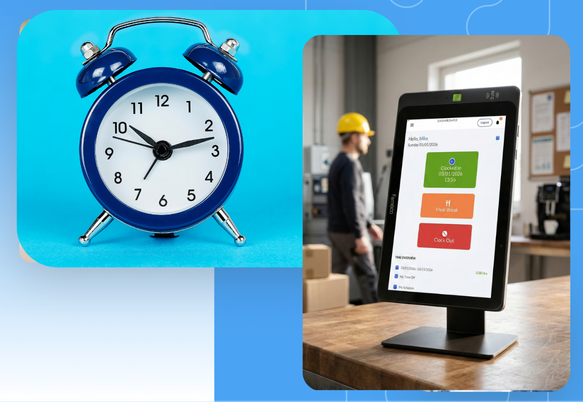


Controllers and Finance Directors evaluating time capture software often discover too late that the platform decision and the time capture method decision are two separate questions and the second one matters more than they expected. This post separates them clearly.
When DATABASICS works with new customers, primarily mid-market organizations in professional services, government contracting, nonprofit, and construction, one of the first conversations is always about how employees will actually record time. Not which software. Not which ERP it connects to. How will the person in the field, or at a desk, or running a job site, put hours into the system?
The answer determines whether your timesheets are accurate, whether your project billing is defensible, and whether your payroll runs without fire drills at the end of every period. It also determines how much resistance you'll get from the workforce during rollout, which is a real implementation risk that doesn't show up in vendor demos.
There are three primary time capture methods. They are not interchangeable. Here is what each one does, where it wins, and where it fails, mapped to the workforce types and compliance requirements we actually see in our customer base.
The Three Methods, Defined
Time Clock
A physical or web-based terminal where employees punch in and punch out at the start and end of each shift. Time is captured in real time, at the moment of work. The system records a timestamp; the employee does not self-report hours after the fact.
Real-time • Location-fixedMobile Punch
A smartphone app that replaces the physical time clock terminal. Employees punch in and out from wherever they are. Can include GPS verification, geofencing, or photo confirmation depending on configuration. Time is still captured in real time.
Real-time • Location-flexibleTimesheet
Employees self-report hours after the fact, typically at the end of a day, week, or pay period. Hours are allocated to projects, tasks, clients, or cost codes. The record is retrospective, not real-time. Most common in knowledge work and project-based environments.
Retrospective • Project-codedThat distinction between real-time and retrospective is not a minor technical detail. It determines your audit posture, your data accuracy, and your compliance exposure, particularly if you do government contracting, DCAA-auditable billing, or grant-funded work.
Where Each Method Shines: Use Cases by Capture Type
Each method was built to solve a real problem. The right question isn't which one is "best." Instead, ask which one matches the way your people actually work. Here's where each one earns its place.
Maximum accuracy for location-based, hourly work
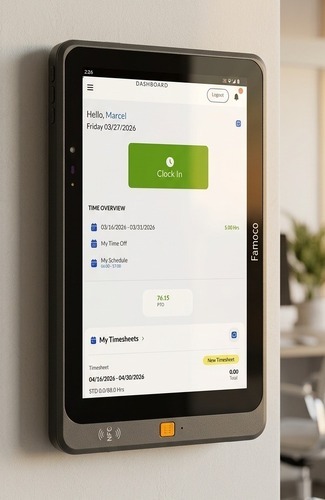 When your workforce shows up to a fixed location to start their shift, the time clock is the gold standard. It captures time at the exact moment work begins: no memory, no self-reporting, no ambiguity.
Real-time capture for workers who move with the work
 Mobile punch brings the time clock to wherever the job is. Employees clock in and out from their phone, with GPS verification and optional photo confirmation replacing the physical terminal. The result is real-time accuracy without the hardware dependency.
Precision allocation for project-based and billable work
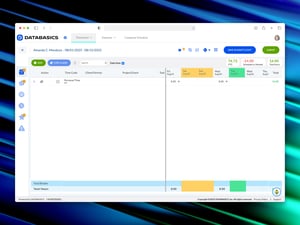 Timesheets are designed for a different problem: not just when did work happen, but where did the hours go. They let employees allocate time across projects, clients, grants, or cost codes and route that allocation through multi-level approval workflows before it flows into payroll, billing, or compliance reporting.
The Real Differentiator: Workforce Composition
Every evaluation conversation eventually comes back to the same question: what does your workforce actually look like? Not your whole organization, the employees who need to track time. The answer almost always reveals that you need more than one method, because almost no organization has a perfectly homogeneous workforce.
Here is how the three workforce profiles map to the right primary method:
Hourly and Shift-Based Workers at Fixed Locations
Manufacturing floor workers, warehouse staff, healthcare aides at a facility, and front desk employees are the time clock's natural home. The terminal is the right tool because the work is location-fixed. There is no reason to give these employees a self-reporting interface when a punch-in/punch-out captures exactly what you need: when they arrived, when they left.
Timesheets fail here for a specific reason: they depend on memory and honesty, and for hourly workers in high-volume settings, the opportunity for rounding errors and manipulation is real. The American Payroll Association estimates that buddy punching, one employee clocking in for another, affects 75% of U.S. businesses and costs employers up to 2.2% of gross payroll. A 10-minute rounding practice, multiplied across 200 employees and 52 pay periods, is a payroll liability you'll only discover in an audit and by then it's already compounded.
Distributed and Mobile Hourly Workers
Field service technicians, construction workers rotating across job sites, home health aides visiting multiple clients; this is where mobile punch earns its place. The workforce is hourly and you want real-time capture, but you cannot put a time clock terminal at every job site or client location.
DATABASICS's Shared Time Clock is a rugged tablet that is purpose-built for this scenario: a hardened device that survives job site conditions and supports facial confirmation, not facial recognition for surveillance, but a lightweight verification that confirms the person punching in is the person assigned to that shift. It bridges the gap between the control of a physical terminal and the location flexibility of mobile.
GPS geofencing is the other critical feature in this category. When a mobile punch platform can verify that the employee was within a defined radius of the job site at the time of punch, you close the loop on remote buddy punching, which is a real concern for distributed hourly workforces.
Salaried Professionals and Project-Based Workers
This is the timesheet's territory, and it is the segment that dominates the DATABASICS customer base. Government contractors billing against CLIN codes. Engineering firms tracking hours to specific projects for client billing. Nonprofits allocating staff time to grants. Consulting firms that need to know exactly how many hours landed on which engagement.
For these organizations, the time clock model is actively counterproductive. A consultant working on three client engagements in a single day cannot punch in and out of a terminal in a way that captures that complexity. They need a timesheet where they can allocate eight hours across three project codes, add notes to justify billable hours, route to a project manager for approval, and produce a record that survives a DCAA audit or client challenge.
The Compliance Angle Finance Leaders Need to Understand
If your organization does any of the following, the method you choose has direct compliance implications that go beyond operational convenience:
Government contracting and DCAA compliance. The Defense Contract Audit Agency requires that timesheets be completed contemporaneously, meaning employees must record time as close to when the work was performed as possible, ideally daily. A system that allows week-end bulk entry with no audit trail of when entries were made is a compliance liability. A properly configured timesheet system with daily entry requirements, timestamp logging, and locked periods after approval creates the contemporaneous record DCAA expects. A time clock alone won't give you the project-cost allocation DCAA audits require.
Grant-funded nonprofits. Federal grant administrators increasingly require effort reporting that demonstrates time allocation to grant-funded activities. Broad payroll-based estimation is no longer sufficient for many grant programs. A timesheet system that lets employees allocate hours to specific grants, captures manager approval, and exports to fund accounting systems (particularly Sage Intacct, which integrates directly with DATABASICS) is the only defensible approach.
Project billing accuracy. For any organization that invoices clients based on hours worked, the method directly determines invoice defensibility. Time clocks cannot capture which project a billable hour belongs to. Timesheets can and when they include notes, approval chains, and integration with your project management or ERP system, they become the source of record for every client invoice you send.
The Integration Question
For Finance Directors evaluating this decision, the time capture method cannot be separated from the integration question. The value of any time data is proportional to how quickly and accurately it flows into your downstream systems.
Here is what each method's integration story actually looks like in practice:
Time clock data flows naturally to payroll for shift calculation. It does not naturally flow to project accounting without a mapping layer, because it captures duration, not cost code. If you need both payroll accuracy and project cost tracking, you're either adding a timesheet layer on top, or you're doing manual reconciliation, which defeats the purpose.
Mobile punch data has the same integration profile as time clock data, with the added advantage of location metadata that can trigger location-based billing rules or job site cost codes. Platforms vary significantly in how well they surface this data to ERP systems; it is a question worth asking in every demo.
Timesheet data is the richest for downstream integration because it carries project codes, activity types, approval status, and notes that can all be consumed by billing, payroll, project management, and ERP systems simultaneously. DATABASICS integrates natively with Deltek, Sage Intacct, SAP, Oracle, NetSuite, Microsoft Dynamics, and others and the timesheet is the record that makes those integrations substantive rather than nominal.
When You Need More Than One Method
Most organizations with more than 100 employees and any workforce complexity will end up needing a platform that can handle multiple capture methods under one approval and reporting framework. The alternative (running separate systems for different employee populations) creates the reconciliation problem you were trying to solve.
What We've Seen Go Wrong in Evaluations
After sitting through enough implementation kick-offs, a few recurring mistakes show up in how organizations approach this decision during the evaluation phase.
Optimizing for the demo, not the rollout. Time clock terminal demos are impressive. The hardware looks authoritative. Mobile punch demos have great UX. Timesheet demos are less flashy. But the metric that matters is adoption rate 90 days after go-live, not how polished the interface looked in a conference room. Ask vendors for their adoption metrics and their escalation rates in the first quarter of deployment.
Underestimating the approval workflow requirement. Every organization says they want "simple approvals." Almost no organization with more than 50 employees and any project complexity actually has simple approvals once you map out their real process. Multi-level approval chains,where a timesheet routes to a project manager, then to a finance reviewer, then locks for payroll, are the norm in government contracting and professional services. Make sure the platform you're evaluating can handle the actual workflow, not a simplified demo version of it.
Treating ERP integration as a checkbox. "Integrates with Sage Intacct" can mean anything from a native, bi-directional sync with field-level mapping to a monthly CSV export. The integration depth determines whether your controllers can trust the data or whether they're reconciling discrepancies every period. For our customers using Sage Intacct, Deltek, or similar ERPs, the integration is the entire value proposition.
Making the decision without HR in the room. Time capture is an HR system, a finance system, and a compliance system simultaneously. The buying committee for this decision has expanded significantly: in DATABASICS's own customer data, 2025 deals routinely involve CFOs, Controllers, HR Directors, and sometimes IT leaders all as active stakeholders. If your evaluation team is finance-only, you will likely select a system that works well for billing and poorly for leave management, or vice versa.
The Bottom Line for Finance Leaders
Time clock, mobile punch, and timesheet are not three versions of the same thing. They are tools designed for fundamentally different workforce situations, and the cost of mismatching them to your workforce is measured in audit exposure, billing inaccuracy, and adoption failure, not just user complaints.
For the majority of DATABASICS customers (mid-market organizations in professional services, government contracting, nonprofit, and engineering) the timesheet is the right primary instrument, specifically because those organizations bill by project, require compliance documentation, and have salaried professionals who need to allocate hours across multiple cost codes in a single day.
For organizations with any hourly workforce component, particularly those with field employees or distributed job sites, a platform that handles both timesheet and mobile punch or time clock under one approval framework is the right architecture. Running separate systems is not a viable long-term answer.
The evaluation question is not "which of these three should we use?" It's "which combination does our workforce require, and which platform handles all of them without forcing us to reconcile data across separate systems?"
See How DATABASICS Handles Your Workforce Mix
We'll map your employee populations to the right capture methods and show you how approval workflows and ERP integration work in practice, not just in a demo.
REQUEST A DEMO
Effective Remote Team Management with Timesheet Software
Read Now
HIPAA Compliance and Expense Reporting: How DATABASICS Helps Healthcare...
Read Now
P-Card FAQs: Answers to the Most Common Questions
Read Now
Avoid These 7 Mistakes When Migrating away from Nexonia
Read Now
Deltek Costpoint Expense Reporting Can Be Streamlined. Here's How.
Read Now