Updated: August 31, 2026 | 24-minute read
Every time and expense software demo can make submitting a timesheet or taking a picture of a receipt look easy. That is not usually where the difficult part starts.
The real test is what happens when employee time and spending have to follow your approval rules, use the right project or grant codes, match corporate card transactions, feed payroll or billing, and reach your ERP with the accounting information finance actually needs.
This guide explains what time and expense software does, which capabilities matter, how integrations should work, where AI fits, what implementation involves, what software can cost, and the questions to ask before choosing a system.
Time and expense software helps organizations collect employee time, manage business expenses, route approvals, enforce policies, and transfer approved information into accounting, payroll, project, billing, or reporting systems.
More advanced platforms may also manage leave, corporate and purchasing cards, project and grant allocations, receipt validation, AI-assisted review, and ERP integrations.
When comparing systems, look beyond time entry and receipt capture. The major differences tend to appear in approval flexibility, project and accounting coding, ERP integration, card reconciliation, compliance controls, implementation, and what happens when a transaction does not follow the normal path.
What is time and expense software?
Time and expense software manages two employee activities that eventually become financial data: the time people spend working and the money they spend on behalf of the organization.
On the time side, employees may enter hours against a project, client, job, task, grant, labor category, or other code. Those records can affect payroll, project billing, job costing, resource planning, and compliance.
On the expense side, employees submit reimbursable expenses or document purchases made with company cards. The system can collect receipts, apply company policy, route transactions for approval, assign accounting and project codes, and prepare approved expenses for reimbursement or accounting.
Some organizations buy separate tools for these processes. Others use a combined time and expense platform because the same employees, projects, managers, accounting structures, and approvals often appear in both workflows.
That last step is important. Time and expense software is rarely an isolated employee app. It sits between employees and financial processes that depend on accurate data.
What features should time and expense software include?
Most vendors can check the basic feature boxes. The more useful question is what each feature can handle when your requirements become specific.
| Capability | What to look for | Why it matters |
|---|---|---|
| Time tracking | Projects, tasks, labor categories, billable time, overtime, clock in/out, mobile entry, and approval | Time may feed payroll, billing, job costing, and compliance. |
| Expense reporting | Receipt capture, OCR, mileage, per diem, reimbursement, multi-currency, and policy controls | Reduces manual entry while creating structured expense records. |
| Corporate and P-cards | Transaction feeds, receipt matching, coding, credits, exceptions, and reconciliation | A card transaction still needs documentation, coding, and accounting treatment. |
| Approvals | Multi-level, conditional, project-based, and amount-based routing | Real approval structures rarely stop at one employee and one manager. |
| Projects and grants | Project, task, grant, fund, cost center, and line-level allocations | Labor and spending may need to reach billing, grant reporting, or project costing correctly. |
| Leave management | Balances, accruals, requests, approvals, and calendars | Leave affects employee availability and, in some environments, time reporting. |
| ERP and payroll integration | Master-data sync, approved transactions, accounting dimensions, error handling, and reconciliation | Re-entry disappears only when the right data reaches the right system in the right structure. |
| AI and automation | Receipt checks, anomaly detection, policy review, recommendations, permissions, and audit history | Automation is useful when finance knows what was checked and what happens next. |
| Reporting | Employee, project, department, grant, expense, labor, and exception reporting | The value of captured data depends on whether managers and finance can use it. |
If you are evaluating products, do not stop at a feature matrix. Ask the vendor to demonstrate your actual workflow, including an exception. A clean expense report following the happy path proves very little.
Why combine time and expense in one system?
Combining time and expense is most useful when both records describe the cost of the same work.
Example: one employee, two projects, several kinds of cost
 An employee works 32 hours on Project A and 8 hours on Project B. During the same week, the employee submits mileage, buys airfare, and pays for a hotel using a corporate card.
Finance does not simply need five completed transactions. It needs those transactions associated with the correct employee, project, accounting codes, approval rules, and payment methods before the information reaches payroll, billing, or the ERP.
Separate systems can still work, but they increase the number of places where the organization must keep projects, employees, departments, approval rules, and accounting structures aligned.
A combined system can give employees one place to work while allowing finance to apply consistent project and accounting structures across labor and spend.
It can also make it easier to answer a more useful question:
What did this project, client, grant, or job actually cost once labor and employee spending are considered together?
Learn more about how DATABASICS combines timesheets and expense reports in one system.
Who needs more advanced time and expense software?
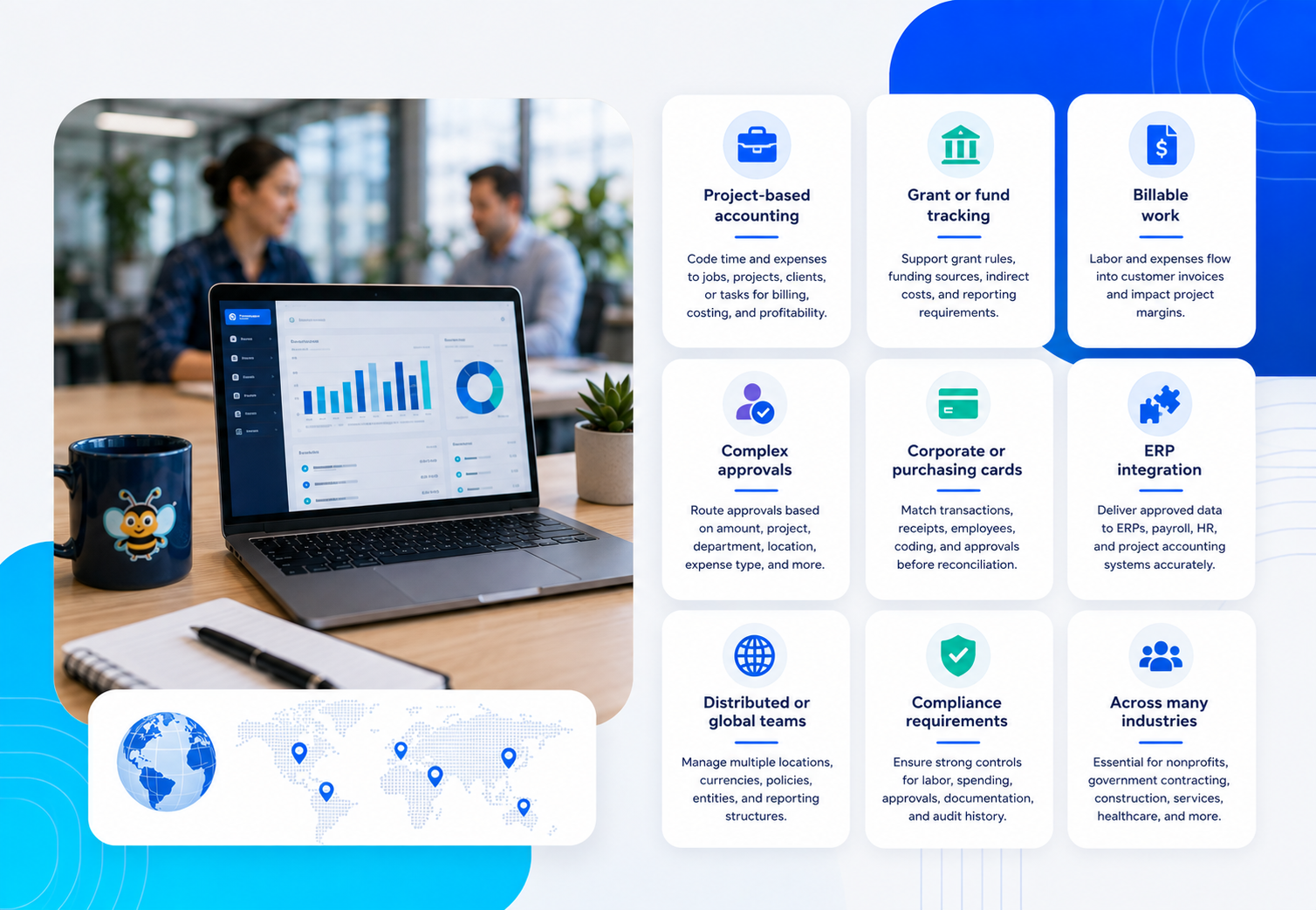 A small company that only needs a basic time clock or occasional employee reimbursement may not need a highly configurable platform.
More advanced time and expense software becomes useful when the information has to satisfy several business processes at once.
Project-based accounting
Labor and expenses need to be coded to jobs, projects, clients, or tasks so finance can support billing, costing, and profitability reporting.
Grant or fund tracking
Time and spending may need to follow funding sources, grant rules, indirect-cost treatment, and reporting requirements.
Billable work
Employee labor and reimbursable expenses may affect customer invoices and project margins.
Complex approvals
Approval may depend on amount, project, department, location, expense type, funding source, or another business rule rather than a single reporting relationship.
Corporate or purchasing cards
Finance needs to match transactions, receipts, employees, coding, and approvals before reconciliation is complete.
ERP integration
Approved activity has to reach systems such as Sage Intacct, Microsoft Dynamics, Oracle NetSuite, payroll, HR, or project accounting systems correctly.
Distributed or global teams
Employees may work across locations, currencies, policies, entities, or reporting structures.
Compliance requirements
Some organizations need stronger controls around labor records, spending, approvals, supporting documentation, or audit history.
These requirements are common in nonprofits, government contracting, professional services, construction, international development, staffing, field services, healthcare, and contract research organizations.
How should time and expense software integrate with your ERP?
“We integrate with your ERP” is not enough information to evaluate an integration.
The important questions are what data moves, which system owns it, when it moves, what happens when something changes, and how the organization handles rejected or failed transactions.
Data that may move from the ERP into the time and expense system
- Employees and users
- General ledger accounts
- Projects, jobs, and tasks
- Customers
- Departments, locations, and other accounting dimensions
- Vendors
- Entities or operating units
Data that may move back to accounting, payroll, or project systems
- Approved time
- Approved reimbursable expenses
- Corporate card expenses
- Project and task allocations
- GL and dimensional coding
- Labor categories or pay-related information
- Tax or currency information where applicable
- Payment or reimbursement information
Some supporting information, such as receipts, approval history, business purpose, and policy exceptions, may need to remain accessible for audit and review without becoming individual fields in the general ledger.
The integration question buyers often miss
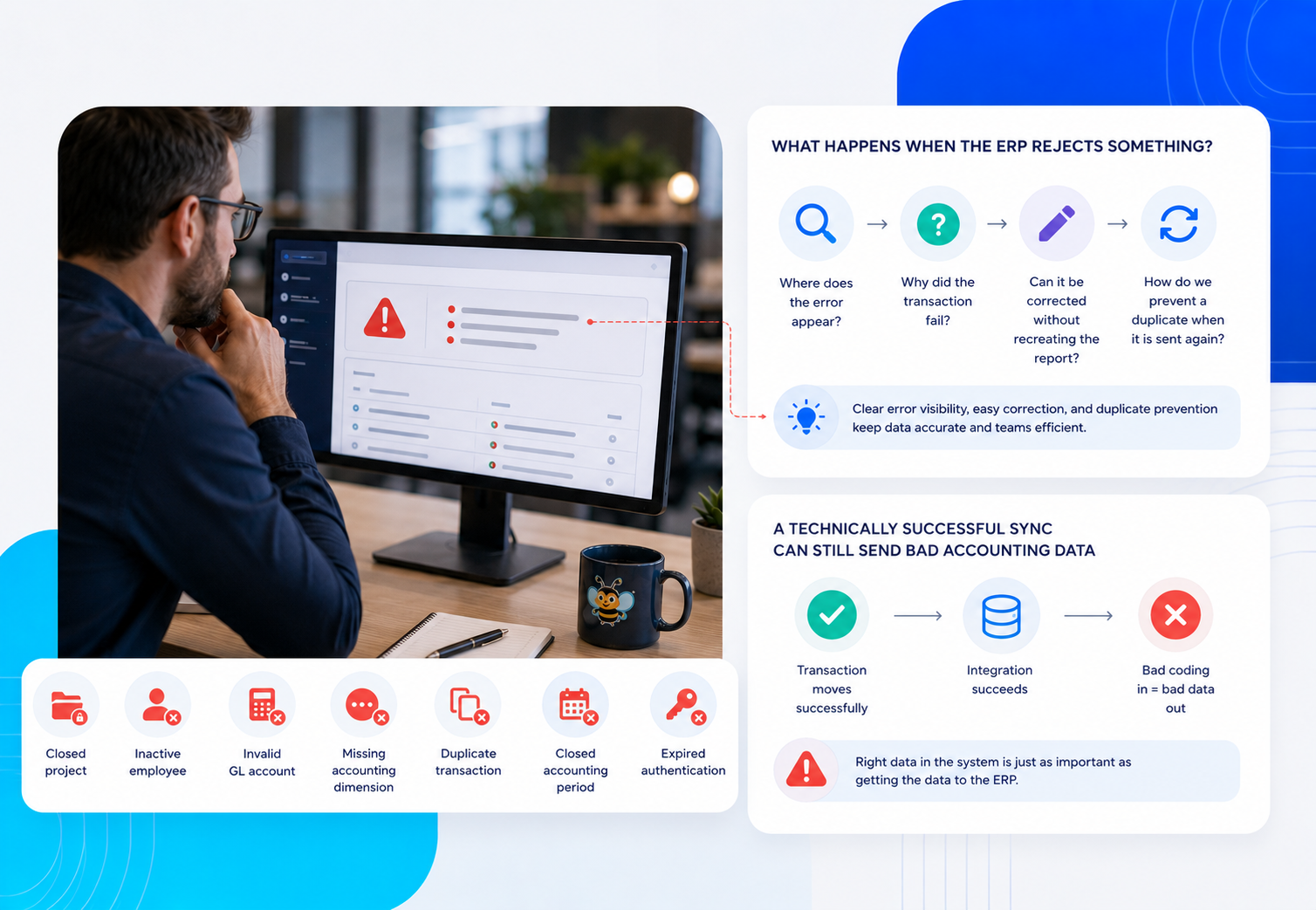 Ask what happens when the ERP rejects something.
Examples include a closed project, inactive employee, invalid GL account, missing accounting dimension, duplicate transaction, closed accounting period, changed grant code, or expired authentication.
Finance should know where the error appears, why the transaction failed, whether it can be corrected without recreating the report, and how the system prevents a duplicate when it is sent again.
A technically successful sync can still send bad accounting data
An API can move a transaction perfectly. If the expense was assigned to the wrong project or accounting dimension before it moved, the integration has simply delivered incorrect data faster.
DATABASICS provides dedicated integration information for Sage Intacct, Microsoft Dynamics 365, and Oracle NetSuite. During evaluation, confirm the exact fields, objects, timing, and mapping requirements for your environment.
How do projects, grants, and cost allocations change the requirements?
Project-based organizations need more from time and expense software than a general expense category such as “Travel” or a timesheet field labeled “Project.”
A transaction may need to carry several pieces of context at once:
- Project or job
- Task or phase
- Customer or contract
- Grant or funding source
- Department or cost center
- Billable or non-billable status
- Labor or expense category
- Business entity or location
The correct structure matters because those fields may determine client billing, project profitability, grant reporting, indirect-cost treatment, management reporting, or the accounting entry sent downstream.
DATABASICS supports project, job, grant, and cost allocations for expenses, including allocation at the report or line-item level.
Test a split transaction before you buy
During a software evaluation, ask the vendor to take one expense and split it between two projects or funding sources.
Then ask how it follows the transaction through approval and into the accounting workflow. That test often reveals much more about a system than a standard product demonstration.
A corporate card feed is not the same thing as reconciliation
Corporate cards and purchasing cards can eliminate some employee reimbursement, but the transaction still has to become a complete accounting record.
A useful card workflow should be able to handle ordinary purchases as well as the cases that create work for finance:
- Missing receipts
- Pending or delayed transactions
- Credits and refunds
- Foreign-currency purchases
- Split allocations
- Personal or non-reimbursable charges
- Duplicate records
- Payment-type mismatches
- Incorrect project or GL coding
Organizations using purchasing cards can review DATABASICS P-Card management capabilities for transaction matching, approval workflows, reporting, and policy controls.
Where does AI fit in time and expense software?
AI is becoming common in finance software, but “uses AI” is not a useful buying criterion by itself.
The better questions are what the AI examines, what evidence it provides, what action it is allowed to take, and when a person stays in control.
| Stage | What AI or automation may do | What the buyer should ask |
|---|---|---|
| Capture | Extract merchant, date, amount, and other receipt information | What happens when extraction confidence is low? |
| Detect | Identify duplicates, mismatches, unusual activity, or policy exceptions | Can the reviewer see why the item was flagged? |
| Recommend | Suggest coding, routing, or a next action | What data was used to make the recommendation? |
| Act | Route, return, correct, or approve certain transactions | Which actions require a person and which can happen automatically? |
| Record | Preserve the reason, recommendation, review, and resulting action | Can finance reconstruct what happened later? |
Receipt scanning also should not be confused with receipt validation. OCR can extract information from a document. Finance may still need to determine whether the receipt matches the card transaction, whether the expense was categorized properly, whether required itemization is present, or whether the same expense appears twice.
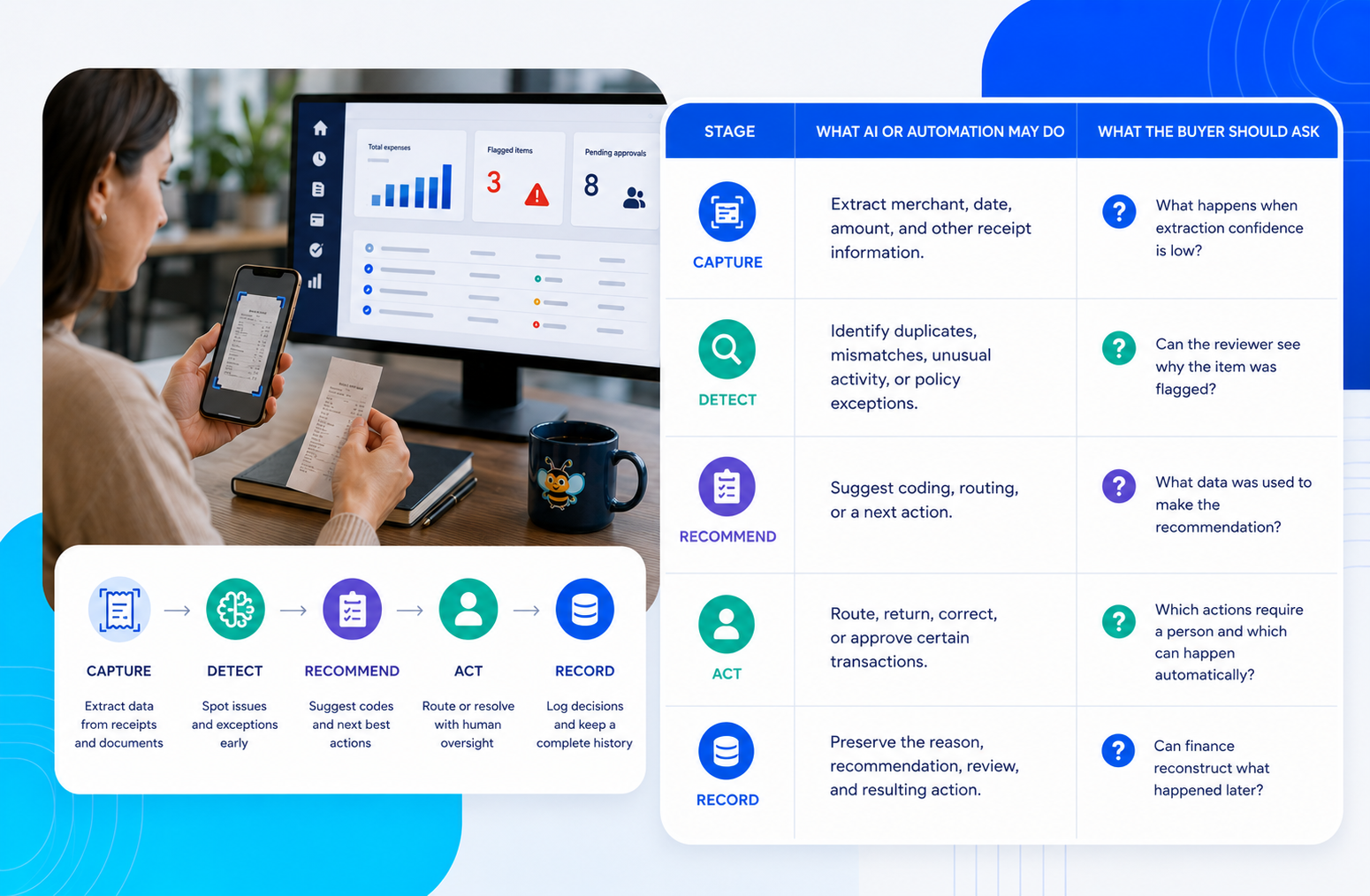 DATABASICS AI Expense Approval adds a review layer before human approval. It can check information such as receipt itemization, transaction details, expense classification, and potential duplicate-payment risk while keeping approval within the organization's workflow.
For a broader framework for evaluating AI in finance and operations software, read What AI in Business Software Should Actually Do.
What happens during time and expense software implementation?
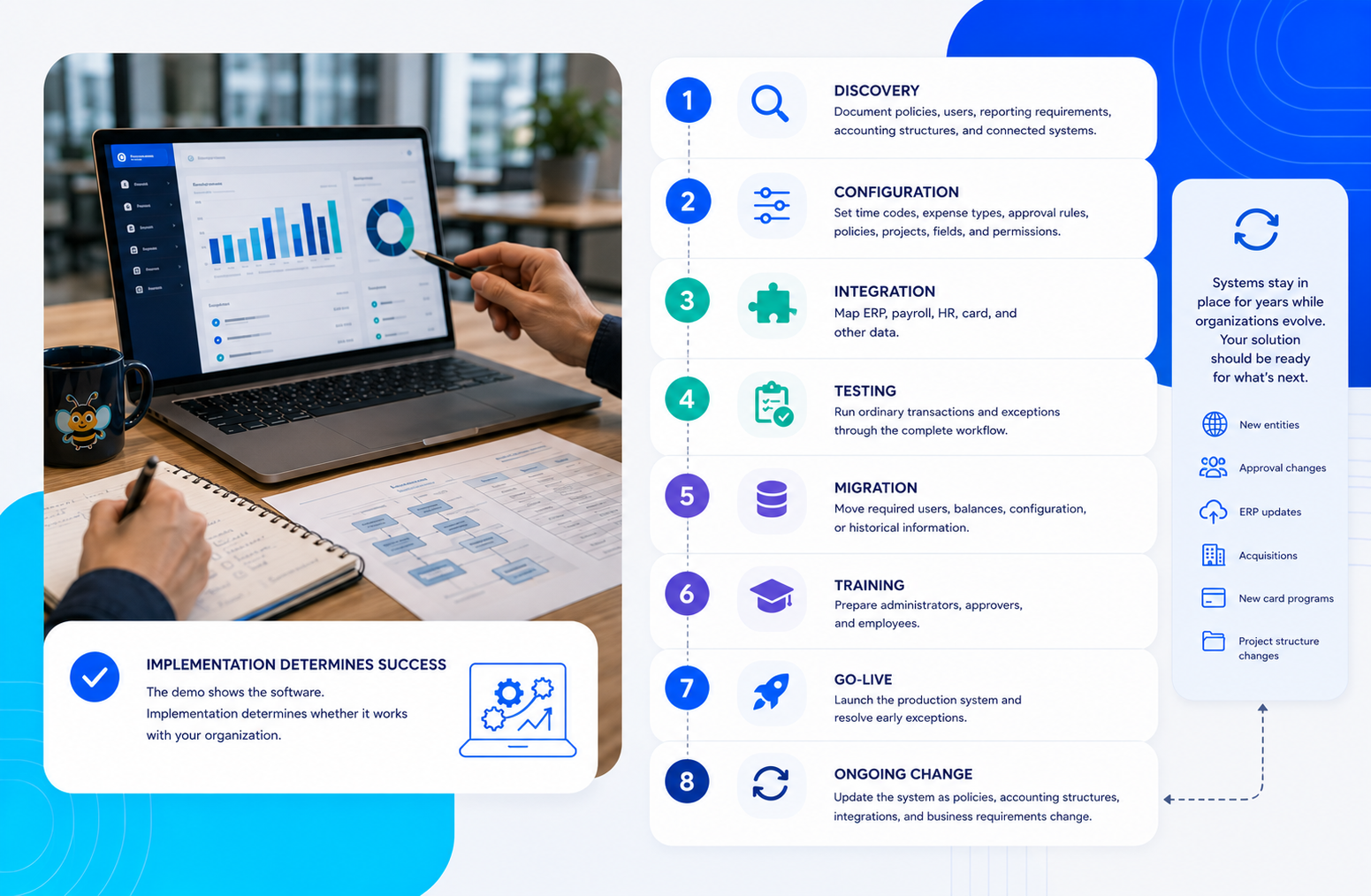 The demo shows the software. Implementation determines whether it works with your organization.
A serious implementation may include:
- Discovery: Document policies, users, reporting requirements, accounting structures, and connected systems.
- Configuration: Set time codes, expense types, approval rules, policies, projects, fields, and permissions.
- Integration: Map ERP, payroll, HR, card, and other data.
- Testing: Run ordinary transactions and exceptions through the complete workflow.
- Migration: Move required users, balances, configuration, or historical information.
- Training: Prepare administrators, approvers, and employees.
- Go-live: Launch the production system and resolve early exceptions.
- Ongoing change: Update the system as policies, accounting structures, integrations, and business requirements change.
The last item is easy to underestimate. A system may stay in place for years while the organization adds entities, changes approval rules, updates its ERP, acquires another company, introduces a new card program, or changes its project structure.
Ask who helps when that happens.
DATABASICS describes its approach as Service as Software: technology handles repeatable work while experienced people help with implementation, configuration, integrations, exceptions, and changing requirements.
If you want a deeper vendor-evaluation checklist, read Seven Questions to Ask Before Choosing Time and Expense Software.
How much does time and expense software cost?
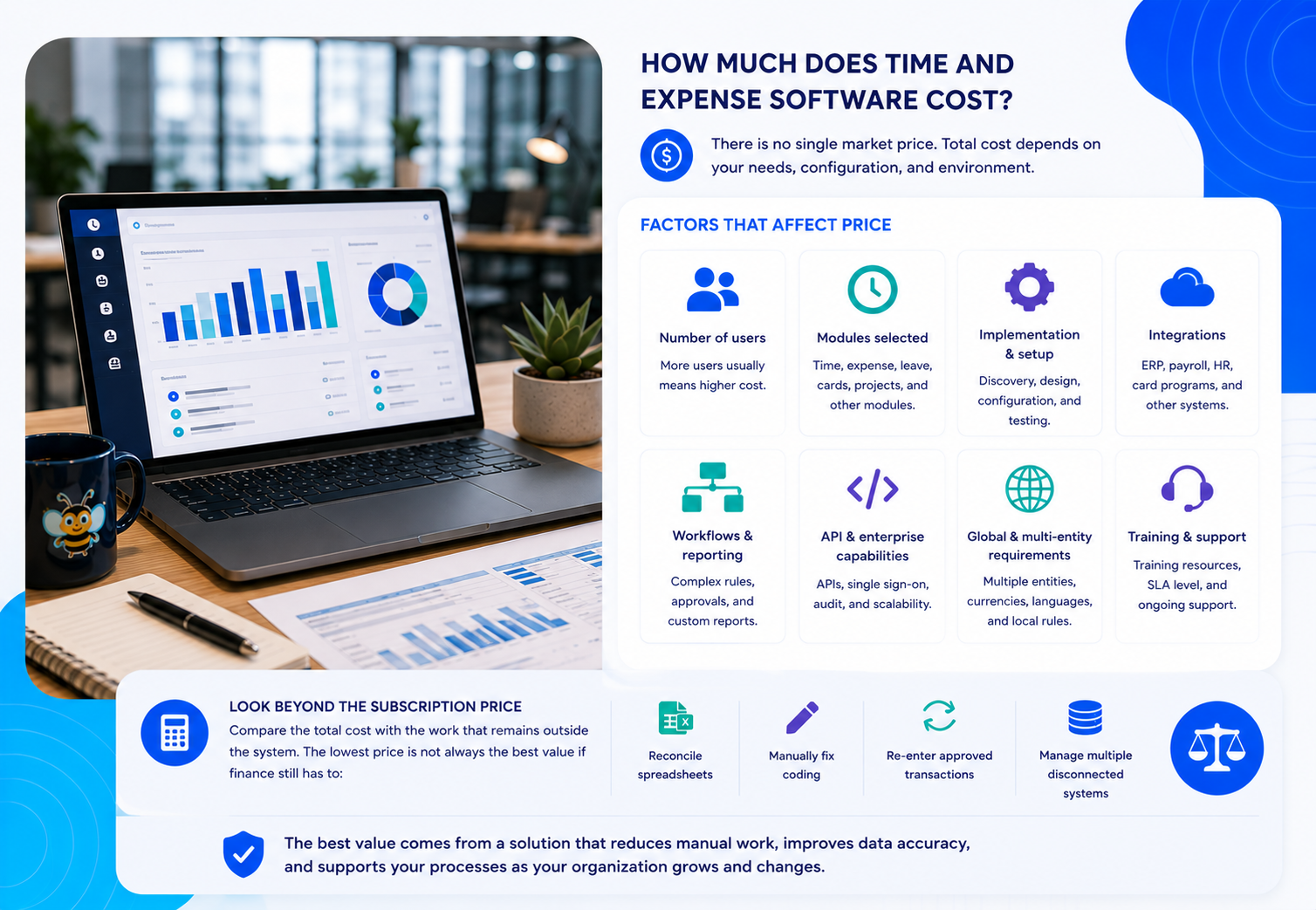 There is no single useful market price for time and expense software because vendors package the category differently.
Total cost can depend on:
- Number of users
- Time, expense, leave, or card modules selected
- Implementation and setup
- ERP, payroll, HR, or card integrations
- Workflow and reporting requirements
- API or enterprise capabilities
- Training and support
- Multi-entity, multi-language, or global requirements
Compare the cost of the software with the work that remains outside it. A lower subscription price can be less attractive if finance still has to reconcile spreadsheets, manually fix coding, re-enter approved transactions, or manage multiple disconnected systems.
DATABASICS pricing
DATABASICS offers different configurations for Time, Expense, and combined Time & Expense requirements. Pricing depends on the selected plan, users, capabilities, and implementation requirements.
Because pricing can change, use the current DATABASICS pricing page for current plan details rather than relying on an older article quote.
How should you compare time and expense software?
Start with your actual business process rather than a list of features.
These ten questions expose many of the differences that matter after purchase:
- Can the same system handle the time and expense processes we actually need?
- How are projects, jobs, grants, departments, and other accounting dimensions managed?
- Exactly what data moves between the system and our ERP, payroll, HR, and card providers?
- Can approval routing follow our real organizational and project structure?
- How are corporate card transactions matched, documented, coded, and reconciled?
- What happens when a transaction is rejected by an integration?
- What can AI or automation do, and where is human approval required?
- Who configures and tests the system before launch?
- Who helps us when a policy, ERP field, project structure, or business requirement changes later?
- Can the vendor show evidence from customers with requirements similar to ours?
Run a round-trip test
Instead of asking a vendor to show another polished dashboard, give them five transactions and ask them to run each one through the full process:
- A normal reimbursable expense
- A corporate card transaction with a missing receipt
- An expense split across two projects
- A transaction using several accounting dimensions
- A transaction rejected by the ERP and then corrected
Follow each transaction from capture through coding, policy review, approval, accounting, and reconciliation. That is much closer to the system you will actually own.
When is DATABASICS a good fit?
No time and expense product is the best fit for every organization. The useful question is whether the system matches the complexity you actually have.
DATABASICS is worth evaluating when...
- You want time and expense in one platform.
- Projects, jobs, grants, or funding sources matter to accounting.
- You have more than a simple manager-approval workflow.
- Time affects payroll, billing, or project costing.
- You need expense and card activity coded into an ERP.
- You use systems such as Sage Intacct, Microsoft Dynamics, or Oracle NetSuite.
- You need configurable workflows rather than a rigid process.
- You value implementation and ongoing support for complex requirements.
You may need something simpler when...
- You are a very small team with occasional reimbursements.
- You only need a basic employee time clock.
- You have no meaningful project, grant, or accounting-allocation requirements.
- Your process is intentionally tied to one simple card program and you do not need broader time or project functionality.
- Your primary goal is the lowest possible entry price rather than configuration, integration, or service depth.
DATABASICS is designed for organizations that need employee time and spending to fit into a broader finance and operations process.
You can see the platform in more detail in the DATABASICS Time & Expense solution overview.
What should customer evidence tell you?
Customer proof is more useful when it answers a specific buying question.
An “easy to use” quote tells you something about usability. It does not prove integration quality, implementation support, or the vendor's ability to handle complex accounting requirements.
When reading reviews and case studies, look for evidence about:
- Implementation and rollout
- ERP or payroll integration
- Project or grant requirements
- Approval complexity
- Employee adoption
- Administrative workload
- Support after launch
- How the system handled changes over time
Review DATABASICS customer testimonials and stories and compare them with independent review sources during your evaluation.
Frequently asked questions about time and expense software
What is time and expense software?
Time and expense software helps organizations collect employee time, manage business expenses, apply policies, route approvals, and prepare approved information for payroll, billing, accounting, project management, or reimbursement. More advanced systems may also manage leave, cards, projects, grants, and accounting integrations.
What is the difference between time tracking software and time and expense software?
Time tracking software focuses primarily on hours worked. Time and expense software also manages employee spending and can connect labor and expense records to the same projects, clients, grants, departments, approvals, and accounting structures.
Can time and expense software integrate with an ERP?
Yes. ERP integrations can exchange employees, projects, accounts, vendors, accounting dimensions, and approved time or expense transactions. The exact records, direction, frequency, and error-handling process vary by system and implementation, so buyers should verify their required workflow rather than relying on an integration logo alone.
Can time and expense software track projects and grants?
Some systems allow time and expenses to be allocated to projects, jobs, tasks, clients, grants, cost centers, or funding sources. This is especially important when labor and spending affect billing, grant reporting, compliance, or project profitability.
Does time and expense software work with corporate cards?
Many expense systems import corporate or purchasing card transactions and match them with employees and receipts. Buyers should also evaluate coding, approval, credits, refunds, personal charges, split allocations, duplicate prevention, and reconciliation.
What is the difference between expense management and spend management?
Expense management usually focuses on employee-generated expenses, reimbursement, receipts, cards, and approvals. Spend management can be broader and may include procurement, accounts payable, vendor spend, budgets, and corporate cards. Product definitions vary, so compare the underlying workflows rather than the category label.
Does OCR verify an expense receipt?
Not by itself. OCR extracts information from a receipt. Verification may also involve comparing the receipt with a card transaction, checking the amount and date, reviewing itemization, identifying duplicates, validating the expense category, and applying company policy.
How is AI used in expense reporting?
AI can help extract receipt information, identify anomalies or mismatches, recommend coding, answer questions about expense data, and assist with approval workflows. Buyers should ask what the AI is allowed to do automatically, what evidence reviewers receive, how permissions are enforced, and what activity is recorded.
How long does time and expense software implementation take?
Implementation time depends on the number of users, modules, integrations, approval rules, accounting dimensions, migration requirements, and testing required. Ask vendors for an implementation plan based on your actual environment rather than a generic average.
What should I look for when replacing an existing time or expense system?
Start with the reason you are replacing it. Common issues include poor ERP integration, difficult reconciliation, weak project or grant tracking, card restrictions, inflexible approvals, employee usability, support, or cost. Test prospective systems against those specific problems rather than choosing the vendor with the longest feature list.